Tag: techie tips

  • No More Password Hassles with LastPass

    No More Password Hassles!

    Treat your password like your toothbrush.
    Don’t let anybody else use it, and get a new one every six months.

    Clifford Stoll                                      Read more at brainyquote.com

    maxresdefault

    Are you ready to put your password hassles to rest once and for all?  I’ve got a great solution for you!   Get LastPass password manager.  It’s free! It will generate secure passwords for all your accounts and insert them automatically. You only need to remember one master password.  Everything is encrypted and safe.

    No more updating pages and pages of accounts and passwords or going through a bazillion steps to reset the ones you forgot!  LastPass even let’s you know if you have an account with a company whose data base has been compromised so you can change your password immediately.

    I’ve been using the basic features of LastPass for years, but I just took a class on it to learn more and I am very impressed.  I had the opportunity to teach a client how to use it this week and she is so happy and relieved that she’s telling all her friends.

    You can learn more about it here  www.lastpass.com  I urge you to use it.  The little bit of time it takes to install and learn how to use it, will be minimal compared to the time it takes to clean up a mess if someone hacks any of your accounts.

    Please share this with everyone you know so they can be safe and feel relaxed, happy and confident with their computers and techie gadgets.

    Please post your thoughts or comments below….

    Thanks!

  • Looking for Work On Craigslist – Safety Tips

    CRAIGSLIST-large570

    Hi Mardi,

    I am still in Brazil.

    I am trying to put an add for a new job on craigslist and I can’t do it.

    I open the craigslist page but I can’t find the right place.

    Could you help me doing that?

    I will try to call you.

    I recently received this message from a client and it reminded me to let you know about a couple of hazards to avoid when you, or someone you know, is looking for work online.

    When I first moved to the Desert, I was looking for work on Craigslist and encountered two potentially dangerous scams.

    The first and most obvious scam, was an email from a company offering me an interview and requiring that I get a credit report to bring to the interview.  They said I needed to get it from the company they recommended and the link to the website was included in the email.

    I couldn’t imagine why someone would need a credit report before an interview or expect me to divulge financial information to a company I didn’t know, so I knew it was a scam.

    facebook login

    The second scam almost got me!  A company said they were interested in me and I could learn more about them at their Facebook page.  At first, I thought it was strange that they didn’t send me to their company website, but then I thought they might be trying to be hip and leading-edge by having a company Facebook page.

    I clicked on the link and it took me to a page that looked exactly like the Facebook sign-in page.  I signed in, but had a weird feeling that something was off.  I looked up at the address bar to see exactly where I was and it said “fakebook.com/….”  I thought oh my gosh, they just captured my Facebook login and password!

    I immediately opened a new window and went to my Facebook page and changed my password.  Luckily I got there, before they were able to changed my password and lock me out.  Whew!

    craigslist banner

    There are good jobs available on Craigslist and I actually found one at that time.

    You just need to be careful and let me know if you have any questions or concerns.

    Please forward this to everyone you know who is looking for work so they can be safe and feel relaxed, happy and confident while using Craigslist.

    Thoughts or comments about this topic?  Please share in comments below.

  • Would You Believe This?

    If you received an email saying this would you believe it?  Think about this

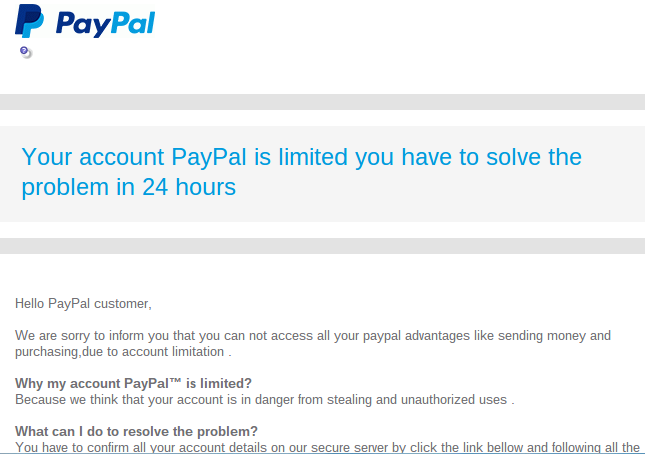
    “Your account PayPal is limited you have to solve the problem in 24 hours”

    Hello PayPal customer,

    We are sorry to inform you that you can not access all your paypal advantages like sending money and purchasing,due to account limitation 

    Why my account PayPal™ is limited?

    Because we think that your account is in danger from stealing and unauthorized uses .

    What can I do to resolve the problem?

    You have to confirm all your account details on our secure server by click the link bellow and following all the steps
    I received this on Wednesday and I was immediately suspicious for several reasons:

    • The wording seemed awkward,
    • The  “24 hours” time frame seemed unnecessary,
    • My PayPal account is linked directly to my bank account, not a credit card that could be compromised
    • My PayPal password is very secure.

    There wasn’t any apparent reason for my account to be “in danger.
    I was pretty sure this was a scam.

    Screenshot 2015-01-30 at 8.09.29 AM

    Instead of clicking on the button in the email that said “Confirm Your Information,”  I went to PayPal directly, logged in to my account and saw that there was no problem there.  The email was a scam just as I had suspected.

    If I had clicked on the button in the email that said “confirm your information” and logged in on their web page, I would have given the scammers the password for my PayPal account.  I don’t know if they would have asked for additional information, like the bank routing number or credit card number.  I know better than to go that far with the process.

    Screenshot 2015-01-30 at 7.56.16 AM

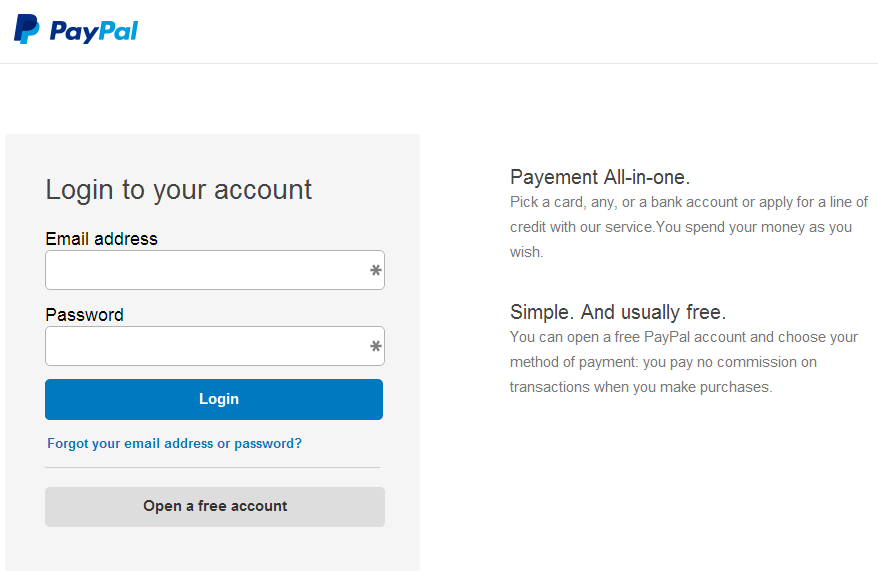
    I clicked on the button to test it for this article and the web address (URL) did not even have the word “PayPal” in it. It was http://realitygameforums.com/confirm.account/verifie.information/update/
    “realitygameforums”!  Really!  If it weren’t so treacherous it would be funny!

    The reason this is so disturbing is that the email and the verification web page looked so authentic.  Many people could be tricked by something like this and I don’t want it to be you!

    This is a common technique for tricking people. It’s called Phishing.

    Phishing is the attempt to acquire sensitive information such as usernames, passwords, and credit card details (and sometimes, indirectly, money) by masquerading as a trustworthy entity in an electronic communication.  Phishing – Wikipedia, the free encyclopedia

    If you ever get emails that appear to be from your Bank or credit card company or any other source that is asking for sensitive information, don’t click on any buttons or links in the email.  Go to your account online and login to see if there are any messages for you; or call the bank, credit card, or other company directly and ask them if there is an issue with your account.

    nortonHere is more information from Norton Internet Security ttp://us.norton.com/transactsafely/phishingscam.jsp

    To protect yourself against phishing, follow these basic guidelines:

    1. Be wary of emails asking for confidential information—especially of a financial nature. Legitimate organizations will never request sensitive information via email.
    2. Don’t get pressured into providing sensitive information. Phishers like to use scare tactics, and may threaten to disable an account or delay services until you update certain information.
    3. Be sure to contact the merchant directly to confirm the authenticity of their request.
    4. Familiarize yourself with a web site’s privacy policy.
    5. Watch out for generic-looking requests for information. Fraudulent emails are often not personalized, while authentic emails from your bank often reference an account you have with them.
    6. Never submit confidential information via forms embedded within email messages.
    7. Never use links in an email to connect to a web site. Instead, open a new browser window and type the URL directly into the address bar.
    8. Maintain effective software to combat phishing. Norton Internet Security automatically detects and blocks fake web sites. It also authenticates major banking and shopping web sites.

    Senior_Year_by_ScarecrowArtist

    I hope you have found this information helpful and that you feel more empowered and secure now.

    Please send this tip to your friends so they will be empowered and protected too.
    Thoughts or comments about this topic? Please share in the comments below.

  • Simple Fixes for Webcam Spying

    Are you scared by all the news stories suggesting that hackers can spy on you through your computer and gadget cameras?

    My mother has been really concerned about it and I understand how scary it can be.  It is almost overwhelming and really annoying when all these “advances” in technology bring new challenges and require more education!

    You don’t need to worry though, I’m dedicated to calming your fears and giving you the information and help you need so you can relax and enjoy your toys again.

    Despite the potential dangers, webcams are great tools for chatting long-distance with friends and family, and conducting  business.

    When you understand how they work and how to secure them, you will feel much better and have more fun.  Enjoy!

    Please help others by forwarding this to all your friends and relatives and encourage them to subscribe to my techie tips so they can be protected and have peace of mind also.  They can click right here to subscribe.  If you are into social media, you can use the sharing buttons provided. That will be a big help also. Thanks!

    INTERNET-ENABLED CAMERAS  Internet Cameras
    Internet-enabled security cameras and baby monitors are becoming more and more common because they are inexpensive and easy to set up.  These gadgets connect to your Wi-Fi network and they are a great way to keep an eye on kids, aging parents and your possessions.

    However, many people don’t follow the directions when setting them up and leave the default username and password in place. Hackers have made it their business to know all the default login information for every gadget on the market.  If you don’t change the factory settings they could find your camera online, log in, and watch you or put you on a website with thousands of other cameras for curious snoops to browse.

    Good News!
    The solution is easy: just remember to change the default password when you set up any type of new gadget. If you buy a camera that doesn’t have a password, exchange it for a different model.

    COMPUTER WEBCAMS  lamptop cam

    Once hackers get on your computer, they can use programs to turn on your webcam without triggering alerts like the webcam light. Thus, covering or unplugging the camera when not in use is a good idea.

    However, hackers could still have full access to your computer. They could rummage through your email, browser history, passwords, documents and anything else they want.

    And, of course, when you do use the webcam, they can eavesdrop.

    To get on your computer, hackers use a remote access tool, or RAT. That’s what tech support agents use to get on your computer remotely to change settings or fix a problem. Fortunately, remote access tools require your permission, so a person can’t just take control without your permission.

    However, hackers have many ways to trick you into letting them on to your computer — fake email attachments, malicious links, Trojan viruses, and phony tech support calls.  Once you’re tricked into running a file, clicking a link, or inviting them on to your system, they can take control and do whatever they want.

    More Good News!

    The solution is pretty simple. Just avoid unsolicited email attachments and links, run up-to-date security software and don’t believe anyone who contacts you claiming to be tech support for a major company.

    Operating systems on your computer may have a remote access tool (RAT) built in. This makes it easier for real tech support to get on your system, but it also makes it easier for a hacker to trick your system into letting them on.

    To turn off Remote Assistance in Windows, go to Start>>Control Panel. In the Search box in the upper right corner, type “remote” and then click the “Allow remote access to your computer” link.

    Uncheck the “Allow Remote Assistance connections to this computer” option and click OK.

    For Macs, go to the Apple icon and select System Preferences. Click the Sharing icon and uncheck Remote Login, Remote Management.

    If you use a company laptop, it could have similar software on it. Companies are supposed to disclose the presence of that kind of software but they don’t always do it, so if it doesn’t belong to you, be mindful of what you do on it.

    smartphone cameraTABLET AND SMARTPHONE CAMERAS

    Tablets and smartphones also have cameras but I haven’t heard of any malicious apps or spying apps that can trigger the camera.  That doesn’t mean they don’t exist, or won’t exist in the future but I will let you know if that changes.

    A word to the wise….if there is something you really don’t want the world to see, don’t put it on your smartphone or tablet.

    If you have any questions or comments about this or if you have any suggestions for future tips, please post a comment below and let me know. I always love to know what you think and how I can help you. Thanks!

  • OpenOffice.org

    Sometimes I Feel Stupid Too!  Computer User Feeling Stupid


    One of the biggest challenges for me in my work is that so many of my clients say they feel so stupid.  No one is stupid!  One of my goals in my work is to help my clients feel better about themselves.


    No one is born with all the information they need in order to navigate life.   We either educate ourselves or we “wing it” based on what we are told by others (who may or may not have the best information).


    Even those of us who take the time to do research, study and practice, will make mistakes. It’s part of the learning process.


    My goal is for you to benefit from my mistakes and those of my clients.


    Here are some really useful tips based on my work in the field this past week.


    Great Money Saving Tip

    OpenOffice.org

    There is a great free office suite called Open Office that looks very much like the apps in Microsoft Office and has many of the same tools.  You don’t need to pay for Microsoft Office suite.


    The Pitfalls

    The address for Open Office is www.openoffice.org not “.com”  There is another site, http://www.openoffice.us.com that looks reputable but will download a bunch of malware programs on your computer.

    firefox-os_logo-wordmark_RGB-vertical-300dpiThe Solution    Google Chrome

    You should be using Mozilla Firefox or Google Chrome.


    If you use Microsoft Internet Explorer as your web browser, you are at risk of getting add pop ups installed on it and having your home page changed to something you don’t want.  This is called “hijacking your web browser”.

    Norton Internet Security


    If you have installed the W.O.T (Web of Trust) extension on your web browser or if you are using Norton with Internet Security, you will see a notification that http://www.openoffice.us.com  is not safe.
    (Buy Norton from Dom at Desert Cow Computers and save $20.) www.mydesertcow.com


    Do a Google search for reviews of any app you are considering downloading before you proceed.

    The Rules In Review

    • Use the right web browser and search engine
    • Have safety extensions on your browser
    • Do your research
    • Be sure you are going to the reputable site


    If none of his makes sense to you, just call for an appointment.

    The promise of successEverything will be OK.   We’ll do it together.


    Hope this helps you “make peace with the ups and downs of modern technology.”


  • The Joys of Airplane Mode

    Airplane Mode for Travel


    Many of us will be traveling and visiting family this time of year.  Here are some tips to enhance the peace and joy of your holiday season.

    Using Airplane Mode on your smartphone isn’t only useful for flights. The feature can prolong your battery life or allow you to unplug and enjoy some uninterrupted family time. Here are some surprising ways you might want to use it.

    1: During a flight

    Screen shot of Settings for Android

    If you have been on a flight in the last few years, you have heard the constant reminders from the flight attendants to turn off all electronic devices. Once the plane has reached an altitude of 10,000 feet, cell phones can be used in airplane mode.

    To activate Airplane Mode on your phone, simply go into the Settings app and turn it on.  There are shortcuts to do this, depending on the type of phone, (ask me to show you on yours next time we see each other) but this method will work for everyone reading this article.

    Once Airplane Mode is activated, your phone turns off both the Wi-Fi and cellular connections. This means you will no longer be able to make or receive calls, texts, or e-mails, or browse the Internet — anything that requires a data connection will not work while Airplane Mode is activated.

    Wi-Fi can be turned back on and connected to a network while phone is in Airplane Mode.  If you are lucky enough to be on a flight with Wi-Fi, you can turn just the Wi-Fi connection back on and send emails, browse the Internet, or send instant messages.  (Again, just go into the settings app and turn the wifi on.)


    Screen shot of Settings for iPhone

    2: To unplug for awhile

    Airplane Mode is a great way to unplug in order to spend some quality time with your family or just take a break from the beeps that seem to control our lives sometimes.

    Putting your phone in Airplane Mode puts you back in control. You may be surprised how quickly you forget that your connection is turned off, and how peaceful your evening can be.

    This is also a great way to silence your phone during important meetings. Don’t worry, all of your messages will be waiting and will download as soon as you turn Airplane Mode off.


    3: While traveling internationally

    Screen shot of Airplane mode on iPhone

    Traveling across borders can be an expensive affair for you and your wireless carrier. International roaming charges are very pricey. One way to avoid the extra roaming fees is to activate airplane mode on your phone and only use Wi-Fi hotspots while you travel. You won’t be able to receive text messages or phone calls, but you will still be able to check your e-mail, use instant messaging, and browse the Internet over a Wi-Fi-only connection.  (You can let people know you will be out of town and suggest they communicate by email until you get back.)


    screen shot of movie on phone

    4: While the kids play games or movies

    Your smartphone can provide a welcome distraction for your young kids or grand kids. However, as you can imagine, kids will start pushing and tapping anything they see on the screen.  You don’t want them accidentally dialing phone numbers or sending random texts. If you are going to let your favorite little people play games or watch a movie on your phone, turn on Airplane Mode before you give your phone to them. This not only prevents them from calling anyone, but it also stops push alerts from interrupting their game or movie.


    5: To save battery

    screen shot of battery status on iPhone

    We have all been in a situation where we suddenly have a low battery and no access to a charger. One way to help slow down battery drain is to turn Airplane Mode on. When your phone is on, even with the screen off, it is constantly searching for and monitoring data connections. Turning those connections off with Airplane Mode will save battery, allowing you to make calls only when you absolutely need to.

  • Critical Safety Tips

    I learned some Important tips this week from my friend and technical specialist, Dominique Fruchtman of Desert Cow Computers.  She is the one I refer for cleaning up the mess when clients get those nasty viruses.
    First, be aware that delivery services like UPS and Fed Ex will not send you emails saying there is a package you have not picked up.  If you receive emails like this that have a link to click, don’t do it.  They contain dangerous virus installation programs.
    Secondly, there is an important distinction between your computer slowing down gradually or slowing down suddenly.  

    If your computer is suddenly running slow, that’s a sign that you might have a virus.  Do not wait!  Call Dominique right away for a diagnosis.  If you wait, you run the risk of having your files stolen and held hostage for ransom.  Seriously!  One of her business clients was told they needed to wire $500 within an hour to get their files back or the ransom would go up to $1000.

    On the other hand, if your computer has been getting slow gradually, you may just need a tune up.  Dominique and her husband Mark can do that for you too.

    Owning techie gadgets is like owning cars, they require maintenance and repairs from time to time.  It’s not wise to wait when you hear funny noises or experience reduced performance.

    Please don’t get upset or stressed about all this.  There are always solutions. Dom and I are here to help you.  The advantages of owning these devices, far out weigh the occasional inconvenience or expense.

    If you, or someone you care about, have questions or frustrations that are clouding the full enjoyment of computers or gadgets, call me for an appointment now.  With a little instruction, everyone can get past the storm and experience the joy. I promise!
  • Convenient & Affordable New Service for You!

    Convenient & Affordable
    New Service for You!join.me

    From time to time, clients have said they wished they could have me on a “retainer” to answer a quick question or get them out of a jam.  We have discussed a subscription service where people would pay a monthly fee, but most people wouldn’t need help every month. This week, the subject came up again and my clients said they would love to be able to “pay as needed”  They suggested that I charge $60 hr. (to keep the math simple) and bill in 15 min increments (to make it worth my time).  I thought it was a great idea and a real win-win solution. I’m excited to be offering this this as a new service.

    I will be happy to answer your questions on the phone, by remote access into your computer, or by email. This is a great option for people who need some help, but don’t need a whole one-hour appointment in their home.  Bring me all those niggling questions and frustrations and let’s get you back to full enjoyment of your techie tools.  Call me today for an appointment!

  • Protect Your Printer Ink From Drying Up

    Have you had issues with your printer ink dying up while you were on vacation or just because it’s so hot?

    Recently, several of my clients have had issues with their printers not printing clearly because the ink has dried up so I thought it would be helpful to give you some tips on how to prevent this.

    Storing and Handling Ink Cartridges

    • TrioKeep ink cartridges sealed in the original package until they are installed. Store at temperatures between -15 and 35 degrees Celsius (5 and 95 degrees Fahrenheit).

    If you don’t print very often, run a test page or print a page of coloured print once in a while to keep the print head clear and the ink running.  

    To keep cartridges from drying out while you are on vacation, always turn the printer off using the power button, and wait until the power light goes out before you pull the plug or turn off a power strip. This allows the printer to move the cartridges to a capped position.

    If you remove a cartridge from the printer for any reason, try to replace it again as soon as possible. Outside of the printer, if unprotected, cartridges begin to dry out. If the printer uses separate ink cartridges and printhead, the printhead can be damaged if cartridges are not installed.

    If you must store opened cartridges for any reason:

    • place them (nozzles up) in a plastic tub with an airtight lid.

      Image: Plastic tub with an airtight lid
    • Some cartridges have an orange cap that is twisted off to open. If these supplies have been opened, replace the orange cap before it is stored.

    • Place a damp cloth or paper in the tub.  Do not use plastic bags. Do not allow anything to touch the cartridge nozzles.

  • FYI for Current Users of Apple iPhone, iPad and iPod

    FYI:  For Current Owners of Apple Gadgets:

    Ipad And Iphone

    The iOS 8 update is available now for users of iPhone 4 and later, iPad 2 and later, iPad mini and later, and iPod touch (fifth generation).

    You may have to delete some things in order to have enough memory to install the update.  It can take quite a bit of time to look at your apps’ usage and decide what to delete.  (Go to Settings > General > Usage)

    I had to dump 2 GB on my iPhone 4s.  I chose to keep my music for my workouts and dump a lot of photos. I also dumped a bunch of apps I wasn’t using very often.  I didn’t care about them anyway so it was a good incentive for me to do some clean up. I will run the update and report back in next week’s Techie Tip.