Tag: safety

  • AOL Phishing Scam

    AOL Phishing Scam

    One of my clients sent this to me yesterday. It’s a Phishing scam, just as she suspected. Good job Harriett!

    AOL HELP.

    Your two incoming mails were placed on pending status due to the recent upgrade to our database,In order to receive the messages Click Here

     to Login and wait for response from  AOL Mail

    .We apologies for any inconveniences 

    Best Regards,

    The AOL! Mail Team
    I was suspicious because of the reference to holding back only two emails.  A big company like AOL doesn’t have time to notify people of small stuff like this.  (Most of the time, companies don’t even notify us of big changes!  LOL )  Mail held up by a “data base upgrade” would most likely just come through later, after the upgrade was completed.

    Of course, being the intrepid, curious researcher that I am, I just had to click on the link to see what would happen.  This is what showed up…

    URL Terminated  

    The TinyURL (p95eoub) you visited was used by its creator in violation of our terms of use. TinyURL has a strict no abuse policy and we apologize for the intrusion this user has caused you. Such violations of our terms of use include:

    • Spam – Unsolicited Bulk E-mail
    • Fraud or Money Making scams
    • Malware
    • or any other use that is illegal.

    If you received spam, please note that TinyURL did not send this spam and we do not operate any email lists. We can not remove you from spammer’s database as we have no association with spammers, but instead we recommend you use spam filtering software.

    This confirmed my suspicions.  I let Harriet know and thanked her for letting me know.

    You are always welcome to email me when you have a concern like this. My mission is to make your computing experience more enjoyable and to help others as well.

    Please forward this to everyone you know so they can be safe and feel relaxed, happy and confident with their computers and techie gadgets.

    Thoughts or comments about this topic?
    Please comment below.

    Thanks!

  • Looking for Work On Craigslist – Safety Tips

    CRAIGSLIST-large570

    Hi Mardi,

    I am still in Brazil.

    I am trying to put an add for a new job on craigslist and I can’t do it.

    I open the craigslist page but I can’t find the right place.

    Could you help me doing that?

    I will try to call you.

    I recently received this message from a client and it reminded me to let you know about a couple of hazards to avoid when you, or someone you know, is looking for work online.

    When I first moved to the Desert, I was looking for work on Craigslist and encountered two potentially dangerous scams.

    The first and most obvious scam, was an email from a company offering me an interview and requiring that I get a credit report to bring to the interview.  They said I needed to get it from the company they recommended and the link to the website was included in the email.

    I couldn’t imagine why someone would need a credit report before an interview or expect me to divulge financial information to a company I didn’t know, so I knew it was a scam.

    facebook login

    The second scam almost got me!  A company said they were interested in me and I could learn more about them at their Facebook page.  At first, I thought it was strange that they didn’t send me to their company website, but then I thought they might be trying to be hip and leading-edge by having a company Facebook page.

    I clicked on the link and it took me to a page that looked exactly like the Facebook sign-in page.  I signed in, but had a weird feeling that something was off.  I looked up at the address bar to see exactly where I was and it said “fakebook.com/….”  I thought oh my gosh, they just captured my Facebook login and password!

    I immediately opened a new window and went to my Facebook page and changed my password.  Luckily I got there, before they were able to changed my password and lock me out.  Whew!

    craigslist banner

    There are good jobs available on Craigslist and I actually found one at that time.

    You just need to be careful and let me know if you have any questions or concerns.

    Please forward this to everyone you know who is looking for work so they can be safe and feel relaxed, happy and confident while using Craigslist.

    Thoughts or comments about this topic?  Please share in comments below.

  • Passwords Can Be Simple and Safe

    Passwords Can Be Simple and Safe

    I know you hate having to use so many passwords.  It’s a big pain to keep track of them.  You might even be using the same password for multiple sites and allowing your web browser to save them so you don’t have to login every time.

    A recent article by Kim Komando, inspired me to encourage you to take the bull by the horns, do some house cleaning and start using a password manager. This will make your online life so much simpler and safer.
    Here are some great tips based on her article, One secret about online accounts every computer user needs to know

    You may have created dozens of accounts that have only been used once. Just think of how many times you’ve created a username and password just to read an article, play a game or download something.  This can be dangerous because your information is floating around on dozens or hundreds of websites that may or may not be secure.  Even worse, if you have used the same username and password for every site, every account you have is in danger.  A hacker who gets your account information from one site can use it to get access to your other accounts as well.

    The solution is to hunt down and close any accounts you are not using and then change the passwords to your existing accounts so that each one is unique.

    A simple browser trick

    1) When you create a new online account or log in to an old one, your browser stores the username and password. This makes it easy to log back in later.  It also means you can go now and see what accounts you’ve created.

    2) After you locate your accounts, you can close down the accounts you are not using and create unique passwords for the sites you are keeping.

    3) Then turn off “password storing” and erase the existing passwords in your browser. The option to erase the passwords is in the same place you view the saved passwords.  (The Instructions are below.)

    Use A Password Manager

    LastPass, The last password you will ever need


    I know this seems like a lot of work but you only have to do it once.  Then, If you start using a password manager like LastPass all your unique passwords will be stored in a vault and you will only need to remember one master password.  The password manager will even generate secure passwords for you so you don’t have to think them up. You will love it!

    If you need help to clean things up or to learn how to use a password manager like LastPass, I’m always here for you. Just call for an appointment.

    Invite some friends to a Play Shop in your home, community room or office.  A play shop is a really fun way to learn and only costs $25 hr. per person.

    Forward this tip to your friends so they will be safe and happier too.
    Thoughts or comments about this topic? Please share in the comment section below.

    Instructions for web browser applications:

    FIREFOX

    To see your login information in Firefox, go to the Firefox menu – it’s the icon on the right with three horizontal lines – and click Options.

    Under the Security tab, click the “Saved Passwords” button.

    Then click the “Show Passwords” button and click “Yes.”

    CHROME

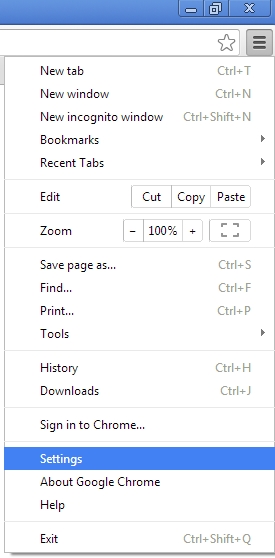
    In Chrome, click the icon with three horizontal lines in the upper right and choose “Settings.”
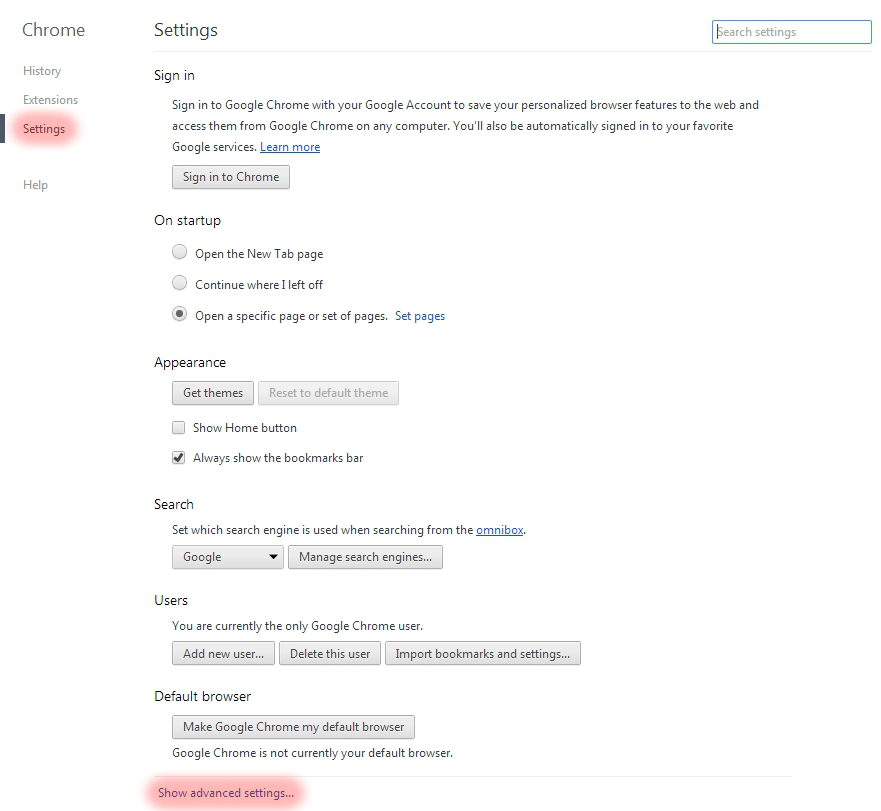
    Choose “Settings” on the left, and then click the “Show advanced settings” link at the bottom of the screen.
    Scroll down to “Passwords and forms” and click the “Manage saved passwords” link.

    If you want to log back into your old account, but don’t remember the password, then you can click on a password and click the Show button next to it.
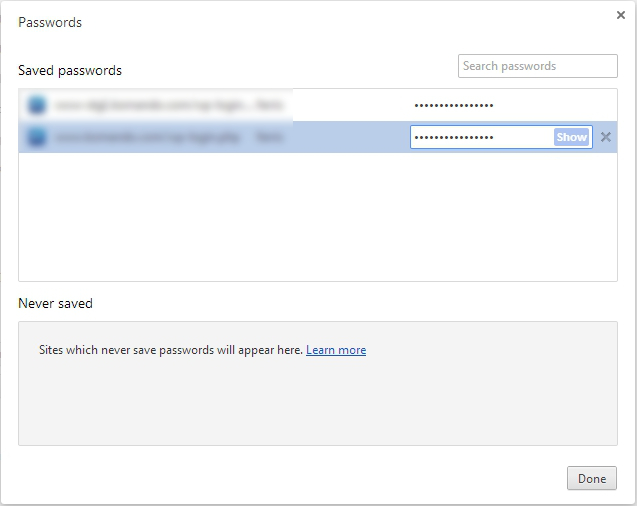
    To see the password, you will have to enter your Windows account password, which does make it harder for casual snoops to get in.

    INTERNET EXPLORER

    You can’t view saved usernames and passwords directly in IE. You would need a third-party program like IE PassView.  However, I recommend that you don’t use Internet Explorer anyway.  It is easily invaded by spyware. I use Google Chrome but Firefox is good also.

    SAFARI

    In Safari, go to Safari>>Preferences>>Auto-fill. Click the Edit button to view the saved passwords.

    Need Help?

    If you need help to clean things up or to learn how to use a password manager like LastPass,  I’m always here for you. Just call for an appointment.

    Invite some friends to a Play Shop in your home, community room or office.  A play shop is a really fun way to learn and only costs $25 hr. per person.

    Forward this tip to your friends so they will be safe and happier too.

  • A Power Strip Does Not Protect You

    A power strip doesn’t protect you!

    Frequently, I go shopping with clients to help them buy new computers, gadgets, printers and accessories.  I want to remind you, and everyone you know, that you need surge suppressors to protect your equipment.  A common power strip is not enough protection.  Also, you need to check your surge suppressors periodically.  

    This is so important that I’m adding it to my list of things to check on all my appointments.  (The other things are virus protection and backup systems — including smart phones and tablets.)

    Don’t confuse surge suppressors with power strips. They look similar, but there is a difference.Power strips have circuit breakers instead of surge suppression.  A circuit breaker will trip the breaker and cut all power to the device.

    A surge suppressor will dissipate the surge so you can keep working.

    Also, a power strip will allow smaller surges to get through and this can wear out your electronics faster.  You need to use a surge suppressor.

    If you already have a surge suppressor but the lights are blinking, the protection is exhausted and you need to buy a new one.  If you’ve had it for 4 years or more, you should replace it anyway.  The blinking warning light may not be working.

    The right level of protection is important, but nothing can guarantee your computer won’t be damaged. A serious surge could blow through your surge suppressor and destroy your computer.  Remember to unplug your computer when a serious storm approaches. 

    No matter how much you prepare, something can always go wrong. That’s the reason you have homeowners or renters insurance. That’s also the reason it’s important to make sure all your data is backed up.

  • Important Reminders From “The Trenches” This Week

    If anyone calls you and says they are from Microsoft and you have a problem on your computer, hang up.  It’s a scam!  Microsoft does not have the time or staff to monitor your computer.  Never let someone access your computer remotely unless you know them.  One of my clients was victimized this week so I wanted to remind you again.

     External hard drives are not the best solution for your back ups!  Hard drives can fail and, if your house were to burn down or be burglarized, you could lose your back up along with your computer.  It’s so sad when people lose valuable docs and precious photos.  There are many cloud-based back-up options available.  Many of them offer free storage.  Please be sure you have back-up systems in place. 

    It is really dangerous to continue to use Windows XP!  Recently a local business was held hostage by a hacker who kidnapped their files and demanded a ransom of $500 within 30 minutes or $1000 if it took more than 30 minutes.  You must have an operating system that is supported by frequent updates and always allow the updates to install.