Tag: Norton

  • Would You Believe This?

    If you received an email saying this would you believe it?  Think about this

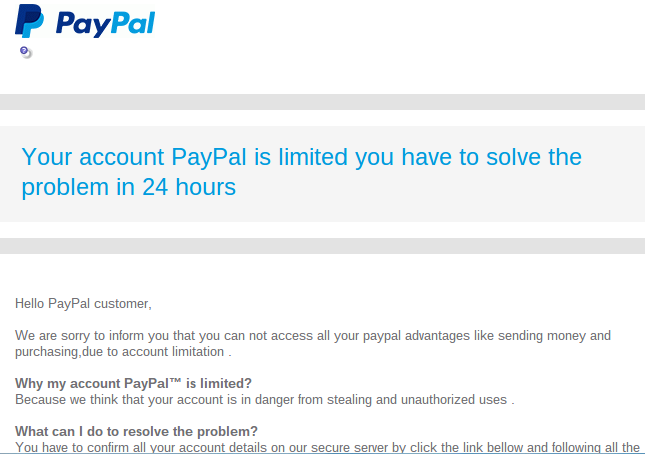
    “Your account PayPal is limited you have to solve the problem in 24 hours”

    Hello PayPal customer,

    We are sorry to inform you that you can not access all your paypal advantages like sending money and purchasing,due to account limitation 

    Why my account PayPal™ is limited?

    Because we think that your account is in danger from stealing and unauthorized uses .

    What can I do to resolve the problem?

    You have to confirm all your account details on our secure server by click the link bellow and following all the steps
    I received this on Wednesday and I was immediately suspicious for several reasons:

    • The wording seemed awkward,
    • The  “24 hours” time frame seemed unnecessary,
    • My PayPal account is linked directly to my bank account, not a credit card that could be compromised
    • My PayPal password is very secure.

    There wasn’t any apparent reason for my account to be “in danger.
    I was pretty sure this was a scam.

    Screenshot 2015-01-30 at 8.09.29 AM

    Instead of clicking on the button in the email that said “Confirm Your Information,”  I went to PayPal directly, logged in to my account and saw that there was no problem there.  The email was a scam just as I had suspected.

    If I had clicked on the button in the email that said “confirm your information” and logged in on their web page, I would have given the scammers the password for my PayPal account.  I don’t know if they would have asked for additional information, like the bank routing number or credit card number.  I know better than to go that far with the process.

    Screenshot 2015-01-30 at 7.56.16 AM

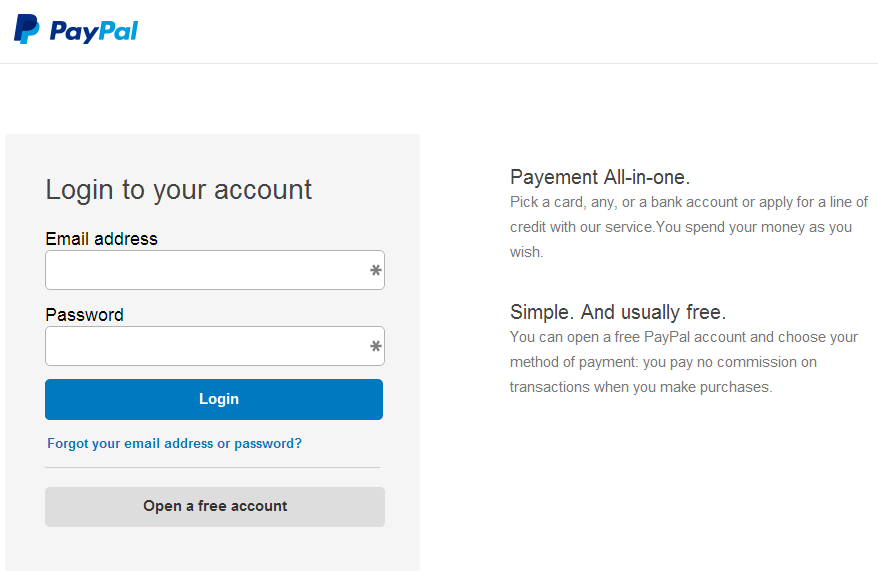
    I clicked on the button to test it for this article and the web address (URL) did not even have the word “PayPal” in it. It was http://realitygameforums.com/confirm.account/verifie.information/update/
    “realitygameforums”!  Really!  If it weren’t so treacherous it would be funny!

    The reason this is so disturbing is that the email and the verification web page looked so authentic.  Many people could be tricked by something like this and I don’t want it to be you!

    This is a common technique for tricking people. It’s called Phishing.

    Phishing is the attempt to acquire sensitive information such as usernames, passwords, and credit card details (and sometimes, indirectly, money) by masquerading as a trustworthy entity in an electronic communication.  Phishing – Wikipedia, the free encyclopedia

    If you ever get emails that appear to be from your Bank or credit card company or any other source that is asking for sensitive information, don’t click on any buttons or links in the email.  Go to your account online and login to see if there are any messages for you; or call the bank, credit card, or other company directly and ask them if there is an issue with your account.

    nortonHere is more information from Norton Internet Security ttp://us.norton.com/transactsafely/phishingscam.jsp

    To protect yourself against phishing, follow these basic guidelines:

    1. Be wary of emails asking for confidential information—especially of a financial nature. Legitimate organizations will never request sensitive information via email.
    2. Don’t get pressured into providing sensitive information. Phishers like to use scare tactics, and may threaten to disable an account or delay services until you update certain information.
    3. Be sure to contact the merchant directly to confirm the authenticity of their request.
    4. Familiarize yourself with a web site’s privacy policy.
    5. Watch out for generic-looking requests for information. Fraudulent emails are often not personalized, while authentic emails from your bank often reference an account you have with them.
    6. Never submit confidential information via forms embedded within email messages.
    7. Never use links in an email to connect to a web site. Instead, open a new browser window and type the URL directly into the address bar.
    8. Maintain effective software to combat phishing. Norton Internet Security automatically detects and blocks fake web sites. It also authenticates major banking and shopping web sites.

    Senior_Year_by_ScarecrowArtist

    I hope you have found this information helpful and that you feel more empowered and secure now.

    Please send this tip to your friends so they will be empowered and protected too.
    Thoughts or comments about this topic? Please share in the comments below.

  • OpenOffice.org

    Sometimes I Feel Stupid Too!  Computer User Feeling Stupid


    One of the biggest challenges for me in my work is that so many of my clients say they feel so stupid.  No one is stupid!  One of my goals in my work is to help my clients feel better about themselves.


    No one is born with all the information they need in order to navigate life.   We either educate ourselves or we “wing it” based on what we are told by others (who may or may not have the best information).


    Even those of us who take the time to do research, study and practice, will make mistakes. It’s part of the learning process.


    My goal is for you to benefit from my mistakes and those of my clients.


    Here are some really useful tips based on my work in the field this past week.


    Great Money Saving Tip

    OpenOffice.org

    There is a great free office suite called Open Office that looks very much like the apps in Microsoft Office and has many of the same tools.  You don’t need to pay for Microsoft Office suite.


    The Pitfalls

    The address for Open Office is www.openoffice.org not “.com”  There is another site, http://www.openoffice.us.com that looks reputable but will download a bunch of malware programs on your computer.

    firefox-os_logo-wordmark_RGB-vertical-300dpiThe Solution    Google Chrome

    You should be using Mozilla Firefox or Google Chrome.


    If you use Microsoft Internet Explorer as your web browser, you are at risk of getting add pop ups installed on it and having your home page changed to something you don’t want.  This is called “hijacking your web browser”.

    Norton Internet Security


    If you have installed the W.O.T (Web of Trust) extension on your web browser or if you are using Norton with Internet Security, you will see a notification that http://www.openoffice.us.com  is not safe.
    (Buy Norton from Dom at Desert Cow Computers and save $20.) www.mydesertcow.com


    Do a Google search for reviews of any app you are considering downloading before you proceed.

    The Rules In Review

    • Use the right web browser and search engine
    • Have safety extensions on your browser
    • Do your research
    • Be sure you are going to the reputable site


    If none of his makes sense to you, just call for an appointment.

    The promise of successEverything will be OK.   We’ll do it together.


    Hope this helps you “make peace with the ups and downs of modern technology.”