Category: updates

  • Are You Doing Your Updates?


    remember-659706-m

    It’s very, very important to allow updates on your computers, tablets and smart phones.  Updates have fixes for “bugs” (program errors that cause malfunctions) and “patches” that prevent breaches in security.  Often the updates contain cool new features too.

    Many people don’t allow the updates because they don’t understand the value, or they don’t know the difference between a reliable update and a scam or virus.  In the past, I have included a list of the names of reliable updates for you to print.
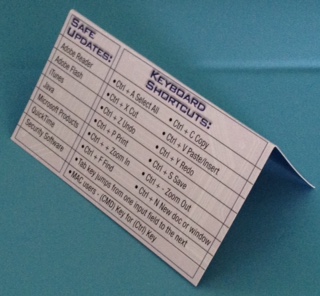
    tent card

    Now, I’ve created a new business card that has the list on it.  It’s designed as a tent card so you can stand it up beside your computer. This is so important that I’d like everyone in our community to have one.  If you need one, or want a bunch to give to your friends, let me know right away.

    That being said, I want you to know that even some reliable updates may come with things you might not want. Companies make marketing agreements to offer other companies’ services.  Don’t worry, just read the screens as you go through the update process. Uncheck any boxes or click “no” to anything that is being offered as an “extra benefit.”
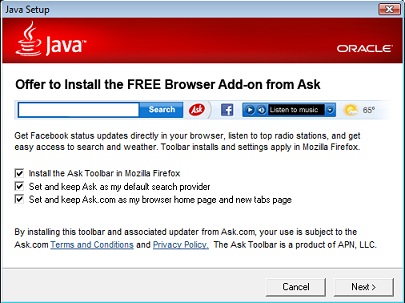
    ask_toolbarJava

    A case in point…I updated Java this week and noticed that Java is still trying to install an Ask Toolbar and change my search engine to Ask.  This has happened to my clients in the past and it’s very confusing.  They call me to find out what happened to their Google search box.

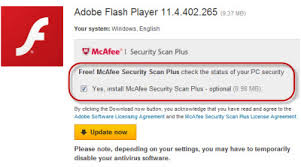
    Even more frustrating is the Adobe Flash update which can install Mcafee antivirus in place of your current antivirus program if you don’t tell it otherwise.adobeflashWithMcAffey
    Please don’t be intimidated and ignore the updates. Just be patient and read the screens before you click “next.”  If you need help, try my new call-in service or make an appointment for a detailed lesson on how to install programs, apps and updates on all your devices.

    Keep Calm and Call Me

    Who do you know that needs to learn how to install programs, apps and updates?  I’m here to help and I promise to take good care of them.  Call me today!   760-348-8867

  • FYI for Current Users of Apple iPhone, iPad and iPod

    FYI:  For Current Owners of Apple Gadgets:

    Ipad And Iphone

    The iOS 8 update is available now for users of iPhone 4 and later, iPad 2 and later, iPad mini and later, and iPod touch (fifth generation).

    You may have to delete some things in order to have enough memory to install the update.  It can take quite a bit of time to look at your apps’ usage and decide what to delete.  (Go to Settings > General > Usage)

    I had to dump 2 GB on my iPhone 4s.  I chose to keep my music for my workouts and dump a lot of photos. I also dumped a bunch of apps I wasn’t using very often.  I didn’t care about them anyway so it was a good incentive for me to do some clean up. I will run the update and report back in next week’s Techie Tip.

  • iPhone VS Android — “The Boys Slug It Out For Another Round”

    iPhone Vs Android
    “The Boys” Slug It Out For Another Round

    Apple and Google went for another round in the competition for market dominance this week as Apple launched it’s larger iPhone 6 models and its iOS 8 operating system for all its gadgets.

    iOS 8 has has some very cool new features and I noticed that many of them are features that Android phones have had for a long time.  (I have used both and currently use an iPhone.)  My son, Jason, who is convinced Android is far better than iPhone and hated to see me switch, sent me this hilarious joke about the news.

    Reaction to the iPhone 6 and iPhone 6 Plus has been lukewarm. Many have accused Apple of playing catch up with rivals such as Samsung, rather than leading the way. An image titled 'Dear iPhone 6 users: Welcome to 2012' has gone viral, (pictured) which lists new Apple features that have existed on Android phones for years

    I asked Jason if he thought I should wait to install the update until the bugs are worked out and the app developers have more time to fix their apps to work with it, and he said,

    Jason Griswold's profile photo

    “Nah, that’s for normal people, we are in tech…we live to have our world turned upside down.”

    He’s so funny!  But it’s true.  I love the challenge, the adventure and being able to make your transitions easier by sharing my experience.

    Who do you know that…

    • Is trying to decide whether to buy an Android gadget or an Apple gadget
    • Needs help with updating to iOS 8
    • Wants a tutorial on the changes and new features or
    • Wants to learn more about their Android phone

    Please let me know so I can help them “make peace with the ups and downs of computer technology.” 

  • Do You Reboot?

    Do You Reboot?

    Network Neurons 1

    Your Techie Tip for this week is to turn your computer completely off at least once a week.  The reason this is important is that its memory gets too full and it’s likely to slow down or get confused.
    (Just like us!)

    During the shutdown process, it files everything away where it belongs and dumps extraneous stuff from the memory.  Kind of like we do when we get a good nights sleep.  Then, when it restarts (reboots), it checks all its systems, corrects any errors, and installs updates.  The installation of the updates is critically important because there are security fixes (patches) in them.

    Asleep 3Your computer is set to go to sleep after a certain period of non-use, and the screen may go dark, but that is not the same as shutting down.  So please choose one night a week to give your machine a complete break and an opportunity for a fresh start in the morning.

    This applies to your tablets, smartphones and other gadgets too.