Category: Techie Tips

  • Fabulous Apple Event! But Will This Make You Truly Happy?

    September 7, was the first time I sat through an entire Apple Special Event because my colleague Jonathan Gorman at The iCreative was hosting a viewing at his training center.  It was quite a production including pop music and dance!  

    I was very impressed with Apple’s innovation and engineering expertise.  The new watches and the dual cameras on the iPhone 7 Plus are pretty amazing.

    On the other hand, I doubt that many people care about these innovations or are willing to pay the prices.  I know most of my clients aren’t.  They just want things simple.  I help them choose the best gadgets for their individual needs and budget.

    I found myself wondering how different the world might be if this kind of ingenuity and money were applied to solving world hunger and poverty.  Sigh….  Maybe the children using the iPads in school will come up with an answer.

    However, one of the main benefits of mobile technology, is that even inexpensive smart phones have cameras capable of taking great pictures and people in developing countries are able to buy them.  Photo sharing on platforms like Facebook and Instagram are bringing the people of the world closer together.  

    Apple’s market share is saturated here in the U.S. (that’s why they want us to upgrade every two years) and I doubt that they’re going to capture much of the foreign market with these high end products.

    Perhaps Apple’s future growth will be based on products we don’t have yet, like robotic cars.  After all, they are famous for creating products we didn’t know we wanted until we had them.  We shall see…

    If you need help to decide on the best computer or gadget for your needs and budget, just let me know.

    Enjoy!

  • Update Your Smartphones

    Did you know that over 30 percent of the world’s PCs are infected with malware, worms, and PUPs (Potentially Unwanted Programs)?

    The Android Operating system is used by many phone manufacturers and this leads to more security vulnerabilities than if Google had complete control over all the phones as well as the operating system.

    iPhones are not perfect, but at least Apple has complete control over its products and their operating systems.  Its customers get the latest updates on a regular basis.

    In either case, you have to say yes to the updates!  In my tutoring work, I see too many phones that have updates waiting to be installed because people are not aware of why it’s important.  Updates contain improvements and important security fixes (“patches”). I know some of the improvements can be confusing, but you really must install the updates! I’m here for you if you need help understanding any changes, and I’ll bet you will really like some of the new features once you learn more about them.

    Here is an excellent article on the best phones of 2016.
    Best 10 SmartPhones of 2016 So Far

    Smartphone market share pie chart from fortune.com

    Fortune Magazine reports that Apple is gaining market share overseas and losing a little in the US.

    The new Samsung S7 phone has put Android in front.  

    “The U.S. market continues to be very competitive as smartphone penetration reached 65% among mobile phone users and 84% of overall mobile phone sales,” she writes. “The pool of available new buyers is shrinking and Android’s wider price range helps them grab late adopters looking for their first smartphone.”

    If you have an Android phone or are considering purchasing one, there is some important information you need to know.

    To keep it simple for you, here are the highlights from a very informative article by Adrian Kingsley-Hughes on ZDNet about security vulnerabilities in Android Phones.   You can read the complete article here.

    Google, in its latest Android Security Report, stated that about 70 percent of “all active Android devices are on a version that we support with patches.”

    However the Android ecosystem consists of about 1.4 billion devices, so 30% equals 400 million devices.  The reason for this discrepancy is that Google is not the only manufacturer of Android phones–only the Nexus phones.

    Google also reported that ” We have provided these regular updates directly to manufacturers since the release of these versions of Android.”  However, Google doesn’t say anything about the proportion of users that are actually getting the updates.

    The infection rate with Potentially Harmful Applications (Malware) averages around 0.5 percent overall, with that figure dropping down to 0.15 percent for devices that only install apps from the Google Play store.  However, even a less-than-1-percent infection rate in more than a billion devices translates into millions of infected devices.

    In any case, the report indicates that Google is doing a better job of finding and patching vulnerabilities than ever and that’s good.

    How does that infection rate compare with PCs?

    According to a PandaLabs report for 2015, over 30 percent of the world’s PCs are infected with malware, worms, and PUPs (Potentially Unwanted Programs). It’s clear that the PC ecosystem is in more of a mess than Android is.  I found this 30% number to be shocking!  Do you and your friends have virus and malware protection on your PCs?

    It’s much harder to draw a comparison between Android and iOS (Apple). While it seems to be much harder to get malware onto iPhones and iPads, it can’t be said that iOS is perfect.

    So, what should Android phone users do?  Android Marshmallow OS

    For Google Nexus users who install the regular trickle of patches, and who only download apps from the Google Play store, the chances of being exposed are small and, even if you are, there’s a good chance that Google will clean things up pretty quickly.

    If you’ve bought a Samsung or BlackBerry product and you only download apps from Google Play and you install updates when they become available, the chances of things going bad are pretty low.

    Keeping up with patching Android and keeping the Google Play store free of toxic apps is a tough job, and the author company thinks Google has certainly embraced the challenge. However, he thinks “there’s real work to be done by the third-party Android hardware makers, along with the carriers, to get patches to users in a more timely fashion.

    The most serious problem is all the old hardware in use. Devices still running Jelly Bean, Ice Cream Sandwich, and Gingerbread, (Android operating systems are named after sweets and are in alphabetical order like hurricane names) account for about a quarter of all active Android devices today.These devices way beyond ever seeing an update.  (Just like Windows XP)

    If you’re an owner of one of these older devices, then you need to give serious consideration to upgrading. This is the real danger zone. While you might be able to dodge a lot of the bullets by being careful and only downloading from Google Play, you’re always going to be at risk from unpatched vulnerabilities such as Heartbleed, Pileup and the like. You’re playing Russian roulette with your data and privacy.

    I hope I have been able to simplify this information so it makes sense to you and that you will heed its advice.  If you have any questions, just let me know.

    Enjoy!

    Mardi

    Please share this with the people you care about so they will be protected.

    If you were forwarded this article and would like to subscribe, click here.

  • Laptop VS Notebook?

    Have you ever wondered about the difference between a laptop and a notebook computer?

    The question came up last week when I was doing a purchase consultation and I thought you might want to know.  Here is a great article that explains and compares them.

    http://www.diffen.com/difference/Laptop_vs_Notebook

    Things To Consider When Buying a New Gadget

    Mardi Speaks to Group about How to Buy The Right Gadget For Your Needs

    Do you belong to a group that would like me to speak about Things to Consider When Shopping for a New Gadget?

    Attendees receive a handy Needs Assessment Questionnaire, and have an opportunity to get their questions answered.

    I do these presentations as a complimentary service because working with gadgets can be soooooo much easier when you buy the right equipment for your individual needs and you can save a lot of money by not buying features you don’t need.  Also, I appreciate the opportunity to connect with new people who might need my services someday.

  • You Can Be A Hoax Slayer

    Displaying Displaying pasted image 0

    Friday, I received a call from a client about a phishing scam that was very convincing. It’s time to review the guidelines again.

    “Be wary of ANY message that claims that you must click a link or open an attachment to upgrade account details, rectify a supposed account issue, or implement new ‘security’ measures. If you receive a suspect message, do not click on any links or open any attachments that it contains. Instead, login to your account by entering the address into your web browser or via an official account application.”

    This particular scam was pretending to be from Microsoft Outlook Team but there are others for Facebook, Yahoo, dating sites, and more.

    Here is a great resource for you: Bookmark http://www.hoax-slayer.com It has information about email, social media and internet scams. Many thanks to Brett for his voluntary service on our behalf.

    Please share this with the people you care about and encourage them to call me whenever they have a question or need help with their techie tools and toys. My passion and mission is to help you and your loved ones more fully enjoy the many benefits of computer technology while keeping it it simple, easy and fun. Thanks!

    Enjoy!
    Mardi

  • Fear Not the F Word!

    From my favorite business development program, www.BookYourselfSolid.com  As an educator, I always want my clients to know and accept that “there are no failures, only lessons.”   Enjoy!

    How I Nearly Got My Mouth Washed Out With Soap

    Ralphies-soap

    Growing up in my family, we never talked about the F word. It was never, ever tolerated.

    My mother was an especially difficult taskmaster. The mere possibility of the F word would incite her fury; and her condemnation. I could get my mouth washed out with soap!

    The F word: Failure. Bad.

    If I brought home a paper or a quiz with a B+, my mother would say, “That’s nice, dear. But it’s not as good as an A.” If I came home with an A, she’d smile and observe, “That’s wonderful dear. But it’s not as good as an A+.” A shadow would hang over a 99; after all it wasn’t a 100. (“Not good enough” was the message.)

    While this spurred in me a drive toward perfection and excellence (and no doubt a bit of neurosis), it also deprived me of opportunities. I eschewed risk because risk could lead to failure.

    I have come to discover – and appreciate – that there are no failures. Only lessons.

    In his fascinating book, Black Box Thinking, Matthew Syed contrasts how failure is understood in the fields of aviation and healthcare. In aviation, pilots and teams are encouraged, without penalty, to disclose and report errors. Failures (accidents) are relentlessly scrutinized (often by analyzing black box data).

    The information gathered is meticulously analyzed, clearly assimilated and rapidly disseminated so that ever more reliable systems and processes can be implemented. The culture surrounding the aviation industry expects and demands this; and the result has been that the fatality rate in aviation has plummeted.

    Aviation accidents now are rare.

    Health care, on the other hand, has demonstrated a culture of obfuscation when it comes to failure. It tends to deny and cover up its errors. Some physicians tend to have an aura of infallibility. The hierarchical structure discourages the questioning of a physician’s decisions. Bad outcomes are clothed in euphemisms. Incident reporting is often frowned upon, and sometimes punished. There is no standardized industry-wide error reporting system.

    Preventable medical accidents are now rampant… and increasing. (By one estimate equal to a jumbo jet falling from the sky every single day!)

    In aviation, failure is the opportunity to learn. In health care, it is a call to circle the wagons… and hide.

    What will it be for you?

    Too often, fear of failure has caused me to keep my head down, to play it safe. Too often I haven’t pushed the edges: Those edges where we grow. (And beyond those edges – oh my, that’s where the magic dwells.)

    Too often, I have made failure personal, a sad story all about me. Rather than saying “It didn’t work,” I would think, “I didn’t work. Poor me.”

    But what’s true is this: Great minds, great creators, great artists, great athletes, great innovators… they embrace failure. They seek it out. They see it as part of a magnificently generative process. They see it… as opportunity.

    They know that the faster you iterate, the faster you fail, the faster you learn what doesn’t work, the faster your journey to success.

    I have discovered, too, that following a tried and true formula like Book Yourself Solid® ensures faster iteration and reliable results.

    By now, I have made a gentle peace with failure. I’m not yet courageous enough to seek it out. But when it shows up – as it often does – I sit it down and listen to it. I study it; and learn from it as best I can. And quietly remind myself that “it” didn’t work; that I’m ok.

    Because I have come to know this: When we study failure – and learn from it objectively – we grow, our businesses flourish, and our lives become richer. When we fear and eschew failure, we deny our humanity, we narrow our potentiality, and we disserve our destiny.

    There is a weary world that needs us, that desperately needs us to show up now, with those gifts and talents that only we can share, unburdened by any of our sad stories of inadequacy.

    So fail forward fast.

    And fear not the F word. It is the road to the business and the life you want.

    Walt

    Walt Hampton, J.D.
    President & Chief Operating Officer
    Book Yourself Solid® Worldwide

  • The Magic of the Right Click

    Some of my most helpful tips are so simple that I don’t think to mention them in my Techie Tips newsletter.  But when a client gets so excited about one, like happened recently, it reminds me to let you know too.  I hope you will enjoy this and be inspired to share it with others.

    Do you use the right click button on your mouse or trackpad?  If not, you must try it.  It reveals a short menu of choices that may be exactly what you need.  You don’t have to waste time searching through all the options on the toolbars at the top of the screen or trying to remember where you found it last time.

    Also, if you use a very large monitor, you won’t waste time running your mouse pointer back and forth between your work area and the toolbars way up at the top of the screen.

    The Apple “magic mouse” and trackpad do the same thing if you double tap them.  My Chromebook trackpad shows the menus with just a single tap on the right side.  Each gadget is a little different and occasionally the feature needs to be set up in the Settings.  Let me know if you need help.

    The menus change, depending on where your pointer is when you click or tap.  For example, if your pointer is on a toolbar, it will have commands related to that toolbar, like Manage Bookmarks or Add Toolbar, or Change Position.  If you right click in the middle of a document, it will offer commands like Copy, and Print.  If you right click on a webpage it will have choices like Back or Print.  If you click on a tab in your web browser you will see Close Tab, New Tab and even Reopen Tab.

    It’s “the best thing since sliced bread”!  When clients get really excited about a tip, it makes my day! I hope you find this helpful and that you will spread the word.

    Enjoy!
    Mardi

  • A Not So Happy Password Day

    Yesterday on the news it was reported that a Russian Hacker stole 272 million usernames and passwords to Hotmail, Gmail and Yahoo email accounts? I got a call from a concerned client so I researched it and emailed all my clients instructions on what to do.

    My goal is always to make techie things as simple and easy as possible, so here are the few simple things you need to know.

    If you use Gmail, Yahoo Mail or Hotmail, you should change your password.  You may not be at risk but do it just to be sure. Even if you use a different email service, you should make sure you have a strong password and that you haven’t used it for more than one account. Bear in mind that you are not only protecting yourself, you are protecting all the people in your address book.  If criminals get into your account, they can send damaging emails to all your contacts.

    1. Make sure your password has 12 characters minimum.

    2. Include numbers, symbols, capital letters and lowercase letters.

    3. Don’t use dictionary words.

    4. Add 2-Step verification — an extra layer of security requiring a code from your mobile device.

    5. Don’t use the same password for more than one account.

    I know this seems like a big pain but it doesn’t have to be.  The easiest way to manage passwords is to use a password manager like Last Pass and it’s free!  For details See my Techie Tip about this here.

    Apple products come with a password manager called Keychain.  Antivirus software programs, like Norton and McAfee, include a password manager.  A password manager can create super secure, unique passwords for all your accounts and you only need to remember one Master Password of your choice!

    If you need help to change the passwords in your accounts or want to learn how to use a password manager like LastPass, just call for an appointment.  Let’s put this niggling password nuisance to rest once and for all so you can more fully enjoy your techie tools.

    I hope you will forward this post.  Not only can it help your friends be safe, but it can prevent hackers from getting into their accounts and sending you dangerous emails. Working together, we can stop this!

    Oh, and “A belated Happy National Password Day”!  How ironic that this story hit the news when it did.  If you want the full news story Click here

    Enjoy!

    .

  • How To Clean Gadget Screens

    People often ask about the best way to clean the screens on their computers and mobile gadgets. I’ve tried a lot of things and I’ve found a simple solution to be the best… plain water or eyeglass spray and a regular size microfiber towel.

    Be sure to reserve a special towel that is used only for gadgets so it won’t have a bit of sand or grit in it from cleaning something around the house.


    Microfiber towel for gadgets only
    Get a nice big one and just keep refolding it into little squares until you have used all the clean surfaces. You will be able to do a lot of cleaning before you have to wash it. (Don’t bother with those itty bitty cloths for eyeglasses…they get dirty too fast and get lost in the wash.)
    Spray water on cloth only
    Be sure you moisten the towel and don’t spray anything directly on the glass because it might seep into the gadget.

    A less “green” solution is to use eyeglass spray and a tissue.  Then you don’t have anything to launder.
    If you enjoyed this tip, please share it so your friends and relatives can enjoy their gadgets more.  Thanks!
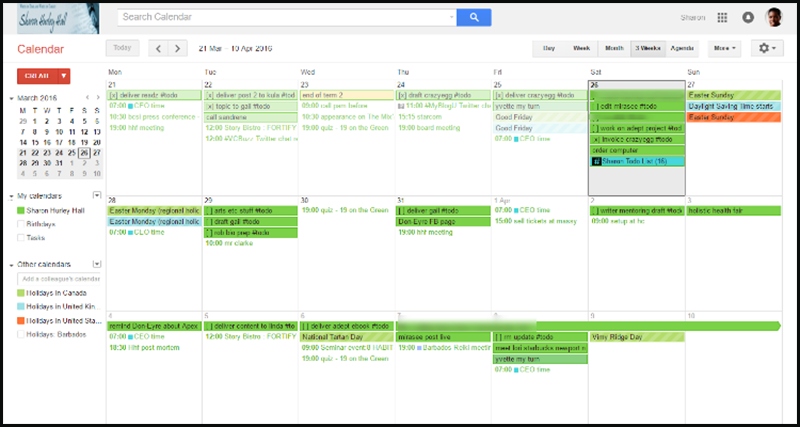
  • How to Manage Your Productivity and Workflow with Google Calendar

    I love Google Calendar and this is a great article about how to use it.  I also was interested to learn how many hours she spends on blog articles.  I feel better now about my Techie Tips taking so long to write.  I hope you enjoy them. If you need help learning how to use Google Calendar, I’m here for you.  Enjoy!


    With so much to remember when running your own business, let Google Calendar handle your workflow for you via @SHurleyHall.

    Source: How to Manage Your Productivity and Workflow with Google Calendar