Category: Phishing

  • You Can Be A Hoax Slayer

    Displaying Displaying pasted image 0

    Friday, I received a call from a client about a phishing scam that was very convincing. It’s time to review the guidelines again.

    “Be wary of ANY message that claims that you must click a link or open an attachment to upgrade account details, rectify a supposed account issue, or implement new ‘security’ measures. If you receive a suspect message, do not click on any links or open any attachments that it contains. Instead, login to your account by entering the address into your web browser or via an official account application.”

    This particular scam was pretending to be from Microsoft Outlook Team but there are others for Facebook, Yahoo, dating sites, and more.

    Here is a great resource for you: Bookmark http://www.hoax-slayer.com It has information about email, social media and internet scams. Many thanks to Brett for his voluntary service on our behalf.

    Please share this with the people you care about and encourage them to call me whenever they have a question or need help with their techie tools and toys. My passion and mission is to help you and your loved ones more fully enjoy the many benefits of computer technology while keeping it it simple, easy and fun. Thanks!

    Enjoy!
    Mardi

  • AOL Phishing Scam

    AOL Phishing Scam

    One of my clients sent this to me yesterday. It’s a Phishing scam, just as she suspected. Good job Harriett!

    AOL HELP.

    Your two incoming mails were placed on pending status due to the recent upgrade to our database,In order to receive the messages Click Here

     to Login and wait for response from  AOL Mail

    .We apologies for any inconveniences 

    Best Regards,

    The AOL! Mail Team
    I was suspicious because of the reference to holding back only two emails.  A big company like AOL doesn’t have time to notify people of small stuff like this.  (Most of the time, companies don’t even notify us of big changes!  LOL )  Mail held up by a “data base upgrade” would most likely just come through later, after the upgrade was completed.

    Of course, being the intrepid, curious researcher that I am, I just had to click on the link to see what would happen.  This is what showed up…

    URL Terminated  

    The TinyURL (p95eoub) you visited was used by its creator in violation of our terms of use. TinyURL has a strict no abuse policy and we apologize for the intrusion this user has caused you. Such violations of our terms of use include:

    • Spam – Unsolicited Bulk E-mail
    • Fraud or Money Making scams
    • Malware
    • or any other use that is illegal.

    If you received spam, please note that TinyURL did not send this spam and we do not operate any email lists. We can not remove you from spammer’s database as we have no association with spammers, but instead we recommend you use spam filtering software.

    This confirmed my suspicions.  I let Harriet know and thanked her for letting me know.

    You are always welcome to email me when you have a concern like this. My mission is to make your computing experience more enjoyable and to help others as well.

    Please forward this to everyone you know so they can be safe and feel relaxed, happy and confident with their computers and techie gadgets.

    Thoughts or comments about this topic?
    Please comment below.

    Thanks!

  • Phishing Alert: Watch Out For This!

    I thought you should know about this right away.

    After seeing my Techie Tip about phishing on Saturday, my daughter sent the following email about a phishing problem with Anthem Insurance.  Even if you don’t have Anthem Insurance, this will reinforce what I said about “phishing. ”

    Heh Mom, Did you know about this?

    Last week, Anthem announced that data might have been accessed about Anthem Healthcare clients.  Apparently, hackers are taking advantage and sending emails and making phone calls asking to verify information.

    Here is the email from the Human Resources Department where she works.

    “Anthem notified us today that members who may have been impacted by the cyber attack should be aware of scam email campaigns targeting current and former Anthem members.  These scams, designed to capture personal information (known as “phishing”) are designed to appear as if they are from Anthem and the emails include a “click here” link for credit monitoring.  Anthem DID NOT send these emails.  If you receive one of these scam emails like the one attached:

    • DO NOT click on any links in email.
    • DO NOT reply to the email or reach out to the senders in any way.
    • DO NOT supply any information on the website that may open, if you clicked on a link in email.
    • DO NOT open any attachments that arrive with email.

    Further, Anthem is not calling members regarding the cyber attack and Anthem representatives are not asking for credit card information or social security numbers over the phone.

    This outreach is from scam artists who are trying to trick consumers into sharing personal data. There is no indication that the scam email campaigns are being conducted by those that committed the cyber attack, or that the information accessed in the attack is being used by the scammers.

    Anthem will contact current and former members via mail delivered by the U.S. Postal Service about the cyber attack with specific information on how to enroll in credit monitoring. Affected members will receive free credit monitoring and ID protection services.

    For more guidance on recognizing scam email, please visit the FTC Website:http://www.consumer.ftc.gov/articles/0003-phishing.

    Anthem has created a website (www.anthemfacts.com), and a hotline, 1-877-263-7995, for its members to call for more information.”

    Please forward this to everyone you know so they can be safe too.
    Thanks,
    Mardi

  • Would You Believe This?

    If you received an email saying this would you believe it?  Think about this

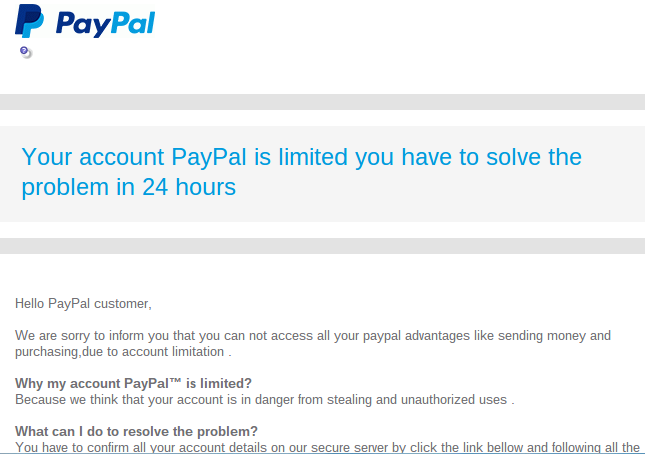
    “Your account PayPal is limited you have to solve the problem in 24 hours”

    Hello PayPal customer,

    We are sorry to inform you that you can not access all your paypal advantages like sending money and purchasing,due to account limitation 

    Why my account PayPal™ is limited?

    Because we think that your account is in danger from stealing and unauthorized uses .

    What can I do to resolve the problem?

    You have to confirm all your account details on our secure server by click the link bellow and following all the steps
    I received this on Wednesday and I was immediately suspicious for several reasons:

    • The wording seemed awkward,
    • The  “24 hours” time frame seemed unnecessary,
    • My PayPal account is linked directly to my bank account, not a credit card that could be compromised
    • My PayPal password is very secure.

    There wasn’t any apparent reason for my account to be “in danger.
    I was pretty sure this was a scam.

    Screenshot 2015-01-30 at 8.09.29 AM

    Instead of clicking on the button in the email that said “Confirm Your Information,”  I went to PayPal directly, logged in to my account and saw that there was no problem there.  The email was a scam just as I had suspected.

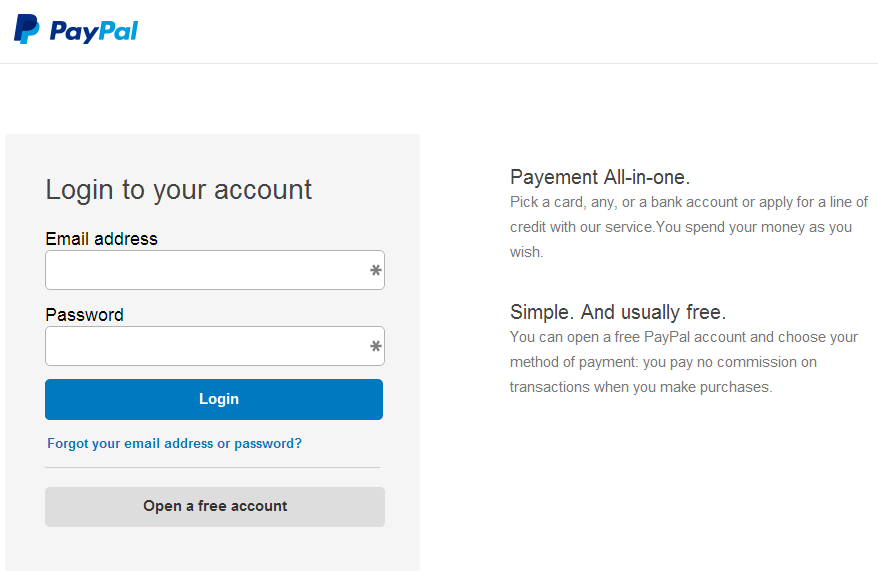
    If I had clicked on the button in the email that said “confirm your information” and logged in on their web page, I would have given the scammers the password for my PayPal account.  I don’t know if they would have asked for additional information, like the bank routing number or credit card number.  I know better than to go that far with the process.

    Screenshot 2015-01-30 at 7.56.16 AM

    I clicked on the button to test it for this article and the web address (URL) did not even have the word “PayPal” in it. It was http://realitygameforums.com/confirm.account/verifie.information/update/
    “realitygameforums”!  Really!  If it weren’t so treacherous it would be funny!

    The reason this is so disturbing is that the email and the verification web page looked so authentic.  Many people could be tricked by something like this and I don’t want it to be you!

    This is a common technique for tricking people. It’s called Phishing.

    Phishing is the attempt to acquire sensitive information such as usernames, passwords, and credit card details (and sometimes, indirectly, money) by masquerading as a trustworthy entity in an electronic communication.  Phishing – Wikipedia, the free encyclopedia

    If you ever get emails that appear to be from your Bank or credit card company or any other source that is asking for sensitive information, don’t click on any buttons or links in the email.  Go to your account online and login to see if there are any messages for you; or call the bank, credit card, or other company directly and ask them if there is an issue with your account.

    nortonHere is more information from Norton Internet Security ttp://us.norton.com/transactsafely/phishingscam.jsp

    To protect yourself against phishing, follow these basic guidelines:

    1. Be wary of emails asking for confidential information—especially of a financial nature. Legitimate organizations will never request sensitive information via email.
    2. Don’t get pressured into providing sensitive information. Phishers like to use scare tactics, and may threaten to disable an account or delay services until you update certain information.
    3. Be sure to contact the merchant directly to confirm the authenticity of their request.
    4. Familiarize yourself with a web site’s privacy policy.
    5. Watch out for generic-looking requests for information. Fraudulent emails are often not personalized, while authentic emails from your bank often reference an account you have with them.
    6. Never submit confidential information via forms embedded within email messages.
    7. Never use links in an email to connect to a web site. Instead, open a new browser window and type the URL directly into the address bar.
    8. Maintain effective software to combat phishing. Norton Internet Security automatically detects and blocks fake web sites. It also authenticates major banking and shopping web sites.

    Senior_Year_by_ScarecrowArtist

    I hope you have found this information helpful and that you feel more empowered and secure now.

    Please send this tip to your friends so they will be empowered and protected too.
    Thoughts or comments about this topic? Please share in the comments below.