Blog

  • Are you wondering if you should upgrade your OS?

    There are major changes happening with computer and mobile gadget operating systems and it’s my mission to make it easy for you to keep up and enjoy the many benefits.

    One of my clients received an email from Microsoft offering a free upgrade to Windows 10 and she wanted to know if I thought it would be better or worse than her Windows 8.1.
    windows 10

    I told her, that it’s too soon to tell.  I recommend that people wait until it has been on the market for at least a year to give them a chance to correct any problems.  There are always bugs and fixes that need to be done with any new software.

    There are many improvements and some neat new features, but we’ll shall see….

    If you are interested in knowing about the new features of Windows 10, Click here.

     Yosemite

    Apple also has a new operating system for it’s computers. It’s been available for quite some time and Apple has issued several important updates.  It’s called OS X Yosemite and it has a lot of cool new features.  If you want to learn more about it click here.

    Chromebook

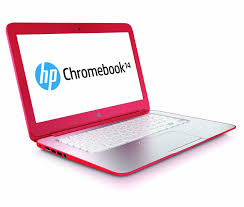
    I’m still really enjoying my Chromebook.  A Chromebook is a laptop of a different breed. Instead of Windows or Mac OS, Chromebooks run Google’s Chrome OS. These machines are designed to be used primarily while connected to the Internet, with most applications and documents living in the cloud and they are much less expensive than other computers.

    If you are thinking about buying a new computer, smart phone or tablet, you might want to consult with me first. In my tutoring, I have the opportunity to play with many kinds of devices so I can give you some good information about their advantages and disadvantages.  I’m proud to say that many of my clients have saved a lot of money and avoided a lot of frustration by consulting with me before they purchased.
    If you buy a new device, have me give you an orientation so you can get up and running quickly and easily. I read the owners manuals and take online classes so you don’t have to.  (“It’s a tough job but somebody has to do it.”  LOL)

    If you found this information helpful, please share it.  


    Enjoy!

    Mardi

  • Money Saving Tips for Cable, WiFi and Best Email Services

    Money Saving Tips for Cable, WiFi and Best Email Services

    Important Tips on Internet service, Wifi and Email providers.

    This past week, I signed up for Time Warner Internet service, and I have several important tips for you.

    1. If you want to get your internet service started faster, you can pick up the modem and WiFi unit at one of Time Warner’s offices and hook it up yourself rather than wait for an appointment with a technician.  It’s pretty simple to do. If you should need help you can call their tech support.  I have found their customer service to be excellent.  (Sometimes there is a bit of a wait to get someone on the line, but I just put the phone on speaker and do something else while I wait.)

    1. If you will be using Time Warner Internet Service for more than a year, you can save money by buying your own modem and WiFi device rather than paying the monthly fees to use Time Warner’s.

    1. Don’t use their email service! (Don’t use Verizon’s or any other internet service provider’s either.)  If you ever change providers, you will lose access to that email address and will have to notify all your contacts of your change of email address.  You should be using an independent service like Gmail, Hotmail, Outlook.com, or Yahoo so you can keep the same email address if you move or have to change internet service providers.  

    Here is a link to an excellent in-depth evaluation of free email services, courtesy of Laptop Magazine.

    Yahoo Mail vs. Outlook.com vs. Gmail vs. AOL Mail

    Note:

    1. I do not recommend AOL.  It has not kept upwith the latest advances and too many of my clients have had major trouble with it, especially the desktop application which crashes and ties up the computer.  I recommend that AOL users move to one of the other services as soon as possible.

    1. Many of my clients have had their yahoo email accounts hacked.  I’m not sure if it is a problem with Yahoo or that my clients have used weak passwords.  Yahoo got high ratings in the above article, so if you decide to use it, be sure to choose a very secure password.

    1. Gmail is my personal favorite, because of it’s many extra features and it’s excellent spam guards.  However, the interface can be confusing and many of my clients do not need all its bells and whistles.  If you want great free productivity tools for your business or personal life, you will love it.
    If you enjoyed this article, please forward this and help your friends and relatives.

    If you were forwarded this email and like it, you can subscribe here.​

  • Best Photo Printing Services

    Best Photo Printing Services

    I’ve been working with a lot of people who wanted a little help learning the best way to store and share the many photos they are taking with their new smart phones.  It’s so much fun when they get excited about their new skills. There are a lot of adorable grandchildren out there and some budding art photographers!

    Even though it’s easy to share photos online, there are times when we like to have prints for our homes or offices.  So this week I thought I would share some easy and affordable ways to do that.

    I have taught several people how to use Walgreen’s website to order prints online and pick them up in the store.  They have been really happy with it. Now, Walgreen’s has an app so you can order prints right from your phone!  Apps are often easier to use than the websites.  Try it, you might like it.  They are offering 33% off your first order!  Click here to learn more

    I did some research to find other options for you.  I found a great article that explains what to look for and has reviews of the top sites, including Walgreens, CVS, Walmart and Costco.  It’s really everything you’ll want to know.  Just click here to read it.

    I hope this techie tip inspires you try ordering prints online or helps you find the best service for your needs.  Please let me know if it does. You can respond to this email or post a comment below.

    If you feel like you need a little coaching to do your first order, let’s set up an appointment.  It’s easier than you may think.

  • Does Your Internet Seem Slow?

    Does Your Internet Seem Slow?

    Based on an article by Fiona Syrett at http://digitalunite.com/

    Here is a simple way to check your speed and some tips for speeding it up.

    When you sign up for broadband, your internet provider (ISP) tells you the maximum speed you can expect. However, the reality can be quite different.

    It’s very easy to find out what speed you’re actually getting.

    Follow these step-by-step instructions to find out your internet speed

    Step 1: Open your web browser – for example, Chrome, Firefox or Safari. (I don’t recommend using Internet Explorer.)

    Step 2: Click in the address bar at the top and type in www.speedtest.net

    Be sure you use “.net” and not “.com.”
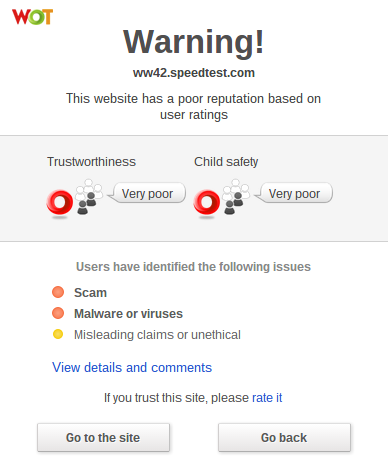
    Note: If you have WOT (Web of Trust) installed on your web browser and you were to accidentally go to “speedtest.com,” instead of “speedtest.net;” you would see this somewhat scary, but very helpful, warning message and you would click on “Go Back.”
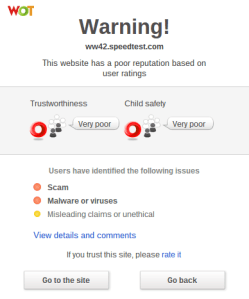
    Wot warning

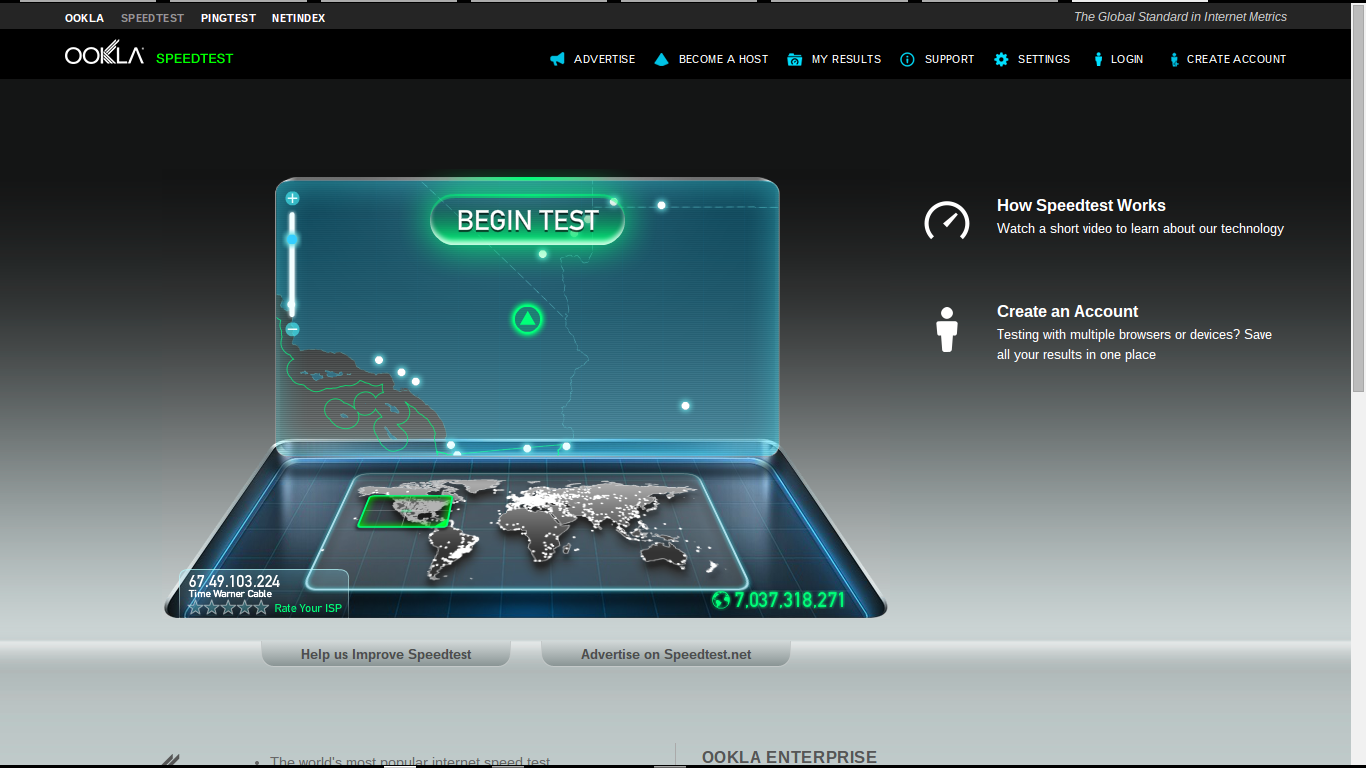
    Step 3: Now, with www.speedtest.net entered in the address bar, press the “Enter” key on the keyboard. This will take you to the website that will check your internet speed.
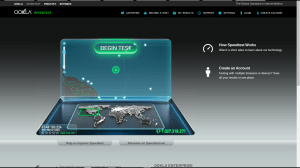
    Speedtestnet

    Step 4: When the page has loaded click “Begin Test.”

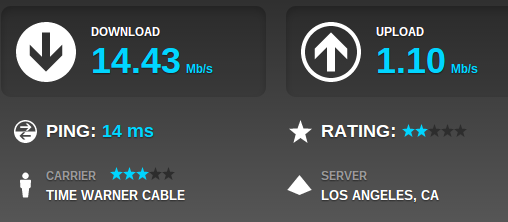
    The results will show you two speeds:

    • The download speed is how long it takes for pages to appear on your screen and to download files such as music files from the internet to your computer.
    • The upload speed is the opposite – for instance, how long it takes to upload photographs from your computer to an online photo album.
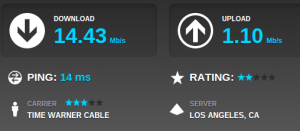
    My speed test

    Internet speeds can vary considerably at different times of the day, so you should check yours more than once.

    If your internet speeds are slower than you think they should be:

    Step 1: Find out what speed you’re paying your internet provider (ISP) for. You may have to phone them to get the answer to this. If you’ve had your broadband for some time, it may be time to upgrade.

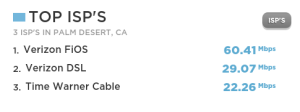
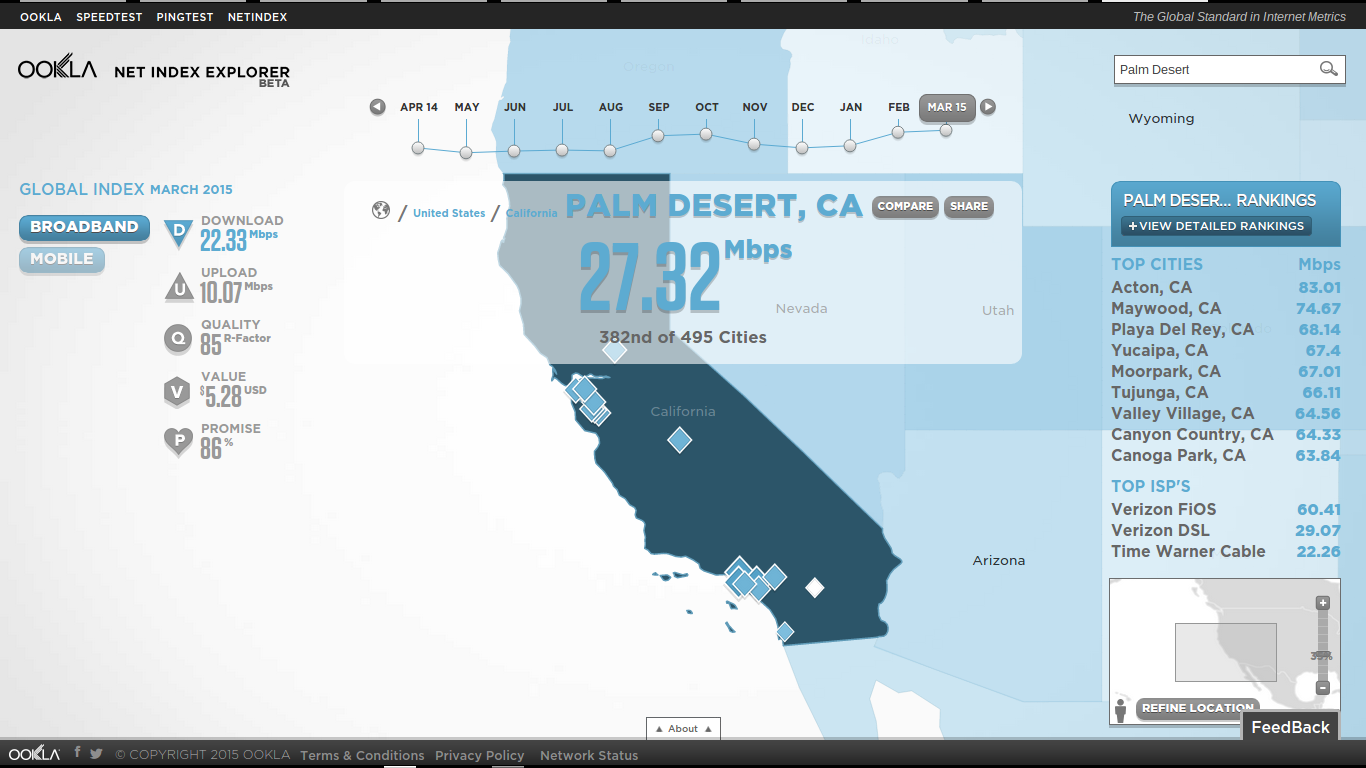
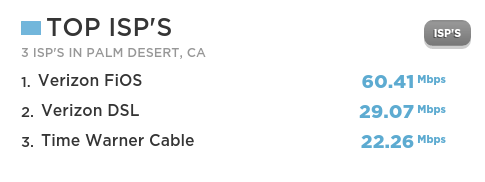
    Step 2: Check what speed is achievable in your area. You can click on the “Net Index” tab at www.speedtest.net and enter the name of your city in the search box.  Here is a screenshot for Palm Desert:
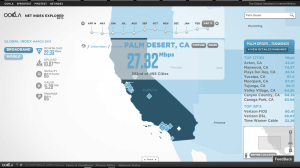
    net index palm desert

    You can also see “Top ISP Speeds:

    Tops isp

    Step 4: Now that you know what speed you’re paying for and what your hardware is capable of producing, there are a number of things you can do that are likely to make your internet run faster:

    • Check that you haven’t exceeded your monthly download allowance. Some ISPs cap internet speeds as a penalty for doing this.
    • If possible, always use the master telephone socket for your broadband router.
    • Don’t use a telephone extension lead with your router. If it’s unavoidable, use the shortest one you can.
    • Make sure that all other telephone sockets in use are fitted with microfilters.  Not doing this can result in loss of internet speed and interference on the line.
    • Make sure your computer isn’t running any unnecessary applications in the background. This can slow things down considerably.  Finding out if it’s happening can be a bit complicated. It might be best to ask an expert for help.
    • Make sure your antivirus software is kept up to date. Viruses and adware can slow down your computer and the internet a lot.
    • If you’re using WiFi (wireless internet), make sure it’s password protected. Otherwise you could be providing your neighbors with free WiFi!
    • If you’re using a laptop with a wireless connection, try using it in a different room or consider using a network cable to connect to the router instead.

    I hope these tips enhance the peace and joy in your techie life.

    Thoughts or comments about this topic?
    Please comment below.

    If you would like to receive my weekly tips via email, you can subscribe here.​

  • Crapware

    Crapware:

    Why manufacturers install it, what you can do about it, and why it’s not going to go away   Based on an article by Adrian Kingsley-Hughes  http://www.zdnet.com/

    Crapware, also know as “bloatware” or “junkware,” are apps that hardware companies install onto their devices on top of the operating system (OS).  It’s a bunch of free trials and demos that nag you to buy the full version. Most annoying to me, is when you start using the app, not realizing that it’s a free trial, and then find out that you have to pay in order to continue accessing the work you’ve done.
    snailThe worst consequence is that crapware can dramatically slow down system performance or even compromise your system’s security. I frequently see relatively new computers running slow because of the weight of the crapware that has been installed on them. They run great once all the junk is removed. One has to wonder about the number of people who spend hard-earned money on a PC only to end up getting a third-rate experience because of crapware.
    Furthermore, many of these dissatisfied PC owners may end up blaming “Microsoft” or “Windows” for the performance issues, when the real problem is that the manufacturing company took money from third-parties to fill their computers with junk.
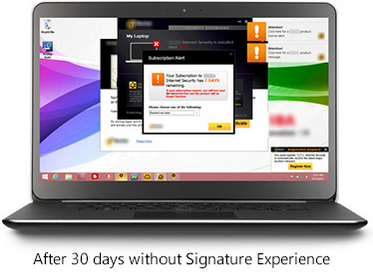
    Microsoft is well-aware of this.  It’s now offering Signature which is free from the clutter that “can slow down your computer and junk up your Start screen or desktop.”  See it here
    Screenshot 2015-03-07 at 1.35.12 PMScreenshot 2015-03-07 at 1.36.27 PM

    If you ask the hardware makers why they install this stuff, they’ll tell you they are offering you extra value. That’s a lie.  They do it because they make money for doing it. Except for Apple products, computer profits are very thin. Hardware makers are happy to install junk onto new systems in exchange for a few extra dollars.

    Photo courtesy of www.kitguru.net
    photo.apple_.windows.crapware (1)


    Eradicating crapware from Windows PCs isn’t easy, and when it comes Android smartphones and tablets it can be almost impossible.  There are tools out there for the PC such as PC Decrapifier and CCleaner that do a reasonable job of cleaning a system, but they’re far from perfect.


    The purveyors of crapware have become wise to these tools and take deliberate steps to make it difficult. It’s best to call my friends at Desert Cow Computers. www.mydesertcow.com

    desert cow computers

    Hardware manufacturers operate in a cutthroat business environment and crapware can make the difference between almost no profit and a little profit, especially on budget systems.  Perhaps you will decide to stay away from budget systems now.
    Microsoft offers the Signature range of PCs and Google sells Nexus-branded devices, These products are free from crapware. If you’re looking for a pure Windows or Android experience, then this might be worth investigating.  Another option is to switch to Apple or Chromebook.

    nexus

    If more people complain or vote with their feet by purchasing crapware-free products, perhaps equipment manufacturers will be persuaded to make crapware easier to remove.

     
    Thoughts or comments about this topic?  Please comment below.  Thanks!

  • No More Password Hassles with LastPass

    No More Password Hassles!

    Treat your password like your toothbrush.
    Don’t let anybody else use it, and get a new one every six months.

    Clifford Stoll                                      Read more at brainyquote.com

    maxresdefault

    Are you ready to put your password hassles to rest once and for all?  I’ve got a great solution for you!   Get LastPass password manager.  It’s free! It will generate secure passwords for all your accounts and insert them automatically. You only need to remember one master password.  Everything is encrypted and safe.

    No more updating pages and pages of accounts and passwords or going through a bazillion steps to reset the ones you forgot!  LastPass even let’s you know if you have an account with a company whose data base has been compromised so you can change your password immediately.

    I’ve been using the basic features of LastPass for years, but I just took a class on it to learn more and I am very impressed.  I had the opportunity to teach a client how to use it this week and she is so happy and relieved that she’s telling all her friends.

    You can learn more about it here  www.lastpass.com  I urge you to use it.  The little bit of time it takes to install and learn how to use it, will be minimal compared to the time it takes to clean up a mess if someone hacks any of your accounts.

    Please share this with everyone you know so they can be safe and feel relaxed, happy and confident with their computers and techie gadgets.

    Please post your thoughts or comments below….

    Thanks!

  • Good News – Phones Unlocked!

    Good News – Phones Unlocked!

    The government has agreed to the unlocking of devices in the United States  This means you can now unlock your mobile phone or tablet (iPhones, iPads, Android smartphones and tablets) and use it with a different wireless network carrier. All major service providers like Verizon, AT&T, T-Mobile, Sprint and U.S cellular are now allowing the unlocking of devices so you can switch to the carrier service that is best for you.  Previously, if you wanted to change your network provider you had to buy a new phone.

    Wireless carriers you can see if you allow images in your email app

    The unlocking policy and methods vary according to the network provider. The unlocking process is free if you fit into the rules set by the provider.  Before making your request to unlock the device, check the company policy and make sure you are eligible.

    Please forward this to everyone you know so they can be safe and feel relaxed, happy and confident with their computers and techie gadgets.

    Thoughts or comments about this topic?
    Please comment below.

    Thanks!

  • AOL Phishing Scam

    AOL Phishing Scam

    One of my clients sent this to me yesterday. It’s a Phishing scam, just as she suspected. Good job Harriett!

    AOL HELP.

    Your two incoming mails were placed on pending status due to the recent upgrade to our database,In order to receive the messages Click Here

     to Login and wait for response from  AOL Mail

    .We apologies for any inconveniences 

    Best Regards,

    The AOL! Mail Team
    I was suspicious because of the reference to holding back only two emails.  A big company like AOL doesn’t have time to notify people of small stuff like this.  (Most of the time, companies don’t even notify us of big changes!  LOL )  Mail held up by a “data base upgrade” would most likely just come through later, after the upgrade was completed.

    Of course, being the intrepid, curious researcher that I am, I just had to click on the link to see what would happen.  This is what showed up…

    URL Terminated  

    The TinyURL (p95eoub) you visited was used by its creator in violation of our terms of use. TinyURL has a strict no abuse policy and we apologize for the intrusion this user has caused you. Such violations of our terms of use include:

    • Spam – Unsolicited Bulk E-mail
    • Fraud or Money Making scams
    • Malware
    • or any other use that is illegal.

    If you received spam, please note that TinyURL did not send this spam and we do not operate any email lists. We can not remove you from spammer’s database as we have no association with spammers, but instead we recommend you use spam filtering software.

    This confirmed my suspicions.  I let Harriet know and thanked her for letting me know.

    You are always welcome to email me when you have a concern like this. My mission is to make your computing experience more enjoyable and to help others as well.

    Please forward this to everyone you know so they can be safe and feel relaxed, happy and confident with their computers and techie gadgets.

    Thoughts or comments about this topic?
    Please comment below.

    Thanks!

  • Phishing Alert: Watch Out For This!

    I thought you should know about this right away.

    After seeing my Techie Tip about phishing on Saturday, my daughter sent the following email about a phishing problem with Anthem Insurance.  Even if you don’t have Anthem Insurance, this will reinforce what I said about “phishing. ”

    Heh Mom, Did you know about this?

    Last week, Anthem announced that data might have been accessed about Anthem Healthcare clients.  Apparently, hackers are taking advantage and sending emails and making phone calls asking to verify information.

    Here is the email from the Human Resources Department where she works.

    “Anthem notified us today that members who may have been impacted by the cyber attack should be aware of scam email campaigns targeting current and former Anthem members.  These scams, designed to capture personal information (known as “phishing”) are designed to appear as if they are from Anthem and the emails include a “click here” link for credit monitoring.  Anthem DID NOT send these emails.  If you receive one of these scam emails like the one attached:

    • DO NOT click on any links in email.
    • DO NOT reply to the email or reach out to the senders in any way.
    • DO NOT supply any information on the website that may open, if you clicked on a link in email.
    • DO NOT open any attachments that arrive with email.

    Further, Anthem is not calling members regarding the cyber attack and Anthem representatives are not asking for credit card information or social security numbers over the phone.

    This outreach is from scam artists who are trying to trick consumers into sharing personal data. There is no indication that the scam email campaigns are being conducted by those that committed the cyber attack, or that the information accessed in the attack is being used by the scammers.

    Anthem will contact current and former members via mail delivered by the U.S. Postal Service about the cyber attack with specific information on how to enroll in credit monitoring. Affected members will receive free credit monitoring and ID protection services.

    For more guidance on recognizing scam email, please visit the FTC Website:http://www.consumer.ftc.gov/articles/0003-phishing.

    Anthem has created a website (www.anthemfacts.com), and a hotline, 1-877-263-7995, for its members to call for more information.”

    Please forward this to everyone you know so they can be safe too.
    Thanks,
    Mardi

  • Looking for Work On Craigslist – Safety Tips

    CRAIGSLIST-large570

    Hi Mardi,

    I am still in Brazil.

    I am trying to put an add for a new job on craigslist and I can’t do it.

    I open the craigslist page but I can’t find the right place.

    Could you help me doing that?

    I will try to call you.

    I recently received this message from a client and it reminded me to let you know about a couple of hazards to avoid when you, or someone you know, is looking for work online.

    When I first moved to the Desert, I was looking for work on Craigslist and encountered two potentially dangerous scams.

    The first and most obvious scam, was an email from a company offering me an interview and requiring that I get a credit report to bring to the interview.  They said I needed to get it from the company they recommended and the link to the website was included in the email.

    I couldn’t imagine why someone would need a credit report before an interview or expect me to divulge financial information to a company I didn’t know, so I knew it was a scam.

    facebook login

    The second scam almost got me!  A company said they were interested in me and I could learn more about them at their Facebook page.  At first, I thought it was strange that they didn’t send me to their company website, but then I thought they might be trying to be hip and leading-edge by having a company Facebook page.

    I clicked on the link and it took me to a page that looked exactly like the Facebook sign-in page.  I signed in, but had a weird feeling that something was off.  I looked up at the address bar to see exactly where I was and it said “fakebook.com/….”  I thought oh my gosh, they just captured my Facebook login and password!

    I immediately opened a new window and went to my Facebook page and changed my password.  Luckily I got there, before they were able to changed my password and lock me out.  Whew!

    craigslist banner

    There are good jobs available on Craigslist and I actually found one at that time.

    You just need to be careful and let me know if you have any questions or concerns.

    Please forward this to everyone you know who is looking for work so they can be safe and feel relaxed, happy and confident while using Craigslist.

    Thoughts or comments about this topic?  Please share in comments below.