Author: Mardi Lynn

  • Thank You To All Our Military Personnel!

    This week, I want to express my profound gratitude for all of you, and yours, who have served in our military.  In the past couple of years, I have been privileged to have several new friends and tutoring clients share about their experiences in World War II and Vietnam.  I have been deeply touched and changed by their stories.  Previously, I had no clue about the bravery, heroism and sacrifices of these amazing soldiers.  Now, for me, Veterans Day and Memorial Day are special days for contemplation and thanksgiving.

    Iris M. Smotrich, Mayor of the City of Rancho Mirage expressed it so eloquently in her Veterans’ Day Tribute that she will be delivering on Tuesday at Forest Lawn.​More info

    “…they leave the love and comfort of their homes to venture worldwide for our independence and the freedom of others.  They return – these valiant warriors – forever changed.  See them now – standing taller, saluting our flag with a snap – perhaps a lump in their throats.  For only they know the true cost of this liberty we so cherish. Only they have walked through hell on earth in order to keep evil at bay for our children.  Only they know the true cost of living up to the declaration that our forefathers so thoughtfully gave to us that all men are created equal, that they are endowed by their Creator with certain unalienable rights, and that among these are life, liberty and the pursuit of happiness.

    Happiness and war are not compatible.  And war can forever scour the edges off of happiness for a warrior.  How proud we are of you – valiant brave men and women who have given so much.  How grateful we are of you dear Veterans. “

    To my heroic friends and clients (you know who you are) and to all the men and women who have stepped up to do the dirty work so I can be free, Thank You!  Thank You! You are my heroes and I appreciate you.

  • New Package Deals!

    Pay in advance for 4 or more hours and save 10%.

    Buying a 4 hour package for $180 saves you $20.  That’s only $45 per hr.  (The hours can be used one or two at a time as you like.)

    The Regular In-home, tutoring rate is now $50 hr. (1 hr. min)

    There is no longer a 1.5 hour minimum requirement so you save $10 over last season’s rates, if you only need a one hour session.

    Tutoring for businesses is $60 hr.  The same package deal is available. Save 10% by purchasing 4 hours or more at one time. Use 1-2 hours at a time, any time.  A 4 hour package saves you $25 and reduces the hourly to $54.

    And remember the remote option for quick questions.
    (See the article below.)

  • Critical Safety Tips

    I learned some Important tips this week from my friend and technical specialist, Dominique Fruchtman of Desert Cow Computers.  She is the one I refer for cleaning up the mess when clients get those nasty viruses.
    First, be aware that delivery services like UPS and Fed Ex will not send you emails saying there is a package you have not picked up.  If you receive emails like this that have a link to click, don’t do it.  They contain dangerous virus installation programs.
    Secondly, there is an important distinction between your computer slowing down gradually or slowing down suddenly.  

    If your computer is suddenly running slow, that’s a sign that you might have a virus.  Do not wait!  Call Dominique right away for a diagnosis.  If you wait, you run the risk of having your files stolen and held hostage for ransom.  Seriously!  One of her business clients was told they needed to wire $500 within an hour to get their files back or the ransom would go up to $1000.

    On the other hand, if your computer has been getting slow gradually, you may just need a tune up.  Dominique and her husband Mark can do that for you too.

    Owning techie gadgets is like owning cars, they require maintenance and repairs from time to time.  It’s not wise to wait when you hear funny noises or experience reduced performance.

    Please don’t get upset or stressed about all this.  There are always solutions. Dom and I are here to help you.  The advantages of owning these devices, far out weigh the occasional inconvenience or expense.

    If you, or someone you care about, have questions or frustrations that are clouding the full enjoyment of computers or gadgets, call me for an appointment now.  With a little instruction, everyone can get past the storm and experience the joy. I promise!
  • Listen Up Sports Fans… There’s An App for That!

    RememberThis week a client asked me if he could watch college football on his new tablet.  Yes!  “There’s an app for that.”  Actually there are a lot of apps available.  There are many free and paid options to watch football, soccer, basketball, tennis and other favorite sports.

    You can download an app through “the company store”. (Google Play for Android devices and The App Store for Apple devices.)

    Here are a few suggestions to get you started. Two good apps for streaming live sports are offered by television stations.

    WatchESPN (ESPN Inc) offers live streaming of events from the ESPN, ESPN2, ESPN3 and ESPNU networks. You can enjoy access to events from the NBA, MBL, U.S. Open, The Masters, college football and basketball, Grand Slam Tennis and Euro 2012 Soccer — as well as original ESPN programming like SportsCenter, Pardon the Interruption and SportsNation. WatchESPN is user-friendly, making it easy to search for your favorite teams, leagues and shows.

    To access WatchESPN’s live stream, you’ll need a cable subscription through a participating cable provider (e.g., AT&T U-verse, Cox, Time Warner Cable or Verizon). The app will prompt you to enter your TV provider, TV subscription user ID and password.

    CBS Sports (CBS Interactive, Inc.) features a live stream of video of top sports, including NCAA and SEC football games. Scores of games that cannot be streamed live are updated very quickly. CBS Sports also offers on-demand access to game highlights, analysis and original programming, as well as a live Twitter feed of commentary from players, writers, analysts and bloggers.  The CBS Sports mobile app features extensive college football coverage including live streaming of some games on Saturday.

    Note:  You may need to download and install Adobe Flash Player, the leading video and animation player. Downloading Adobe Flash Player is free, quick and easy.

    NBA League Pass Mobile allows you to follow the league through live NBA game viewing in addition to on-demand game replays and league highlights. The league Pass costs $16.99 per season and is available through the NBA Game Time mobile app.

    MLB.tv offers the At Bat 13 subscription service, which features home and away broadcasts, HD quality video, full game archives and in-game highlights and stats. A season pass is $19.99 and premium subscribers have access to live video feeds.

    In addition to apps, you can find websites that can connect you to an online broadcast of the sporting event you want to watch.  Just do a search in your web browser.  You may want to check out Ustream, FirstRow Sports and Stream2Watch.


    Note:  Streaming sports live does limit the life of your battery because it requires you to use your data connection plus the audio and video components of your device’s hardware.  To prolong the life of your battery, try dimming the screen and turning off any unnecessary features (e.g., Bluetooth). Make sure to have a power adapter on hand to juice up your battery when the need arises.

    If you, or someone you know, needs to learn more about how to search for good apps, or websites, I’d love to help. Call me today!

    Share your favorite apps and websites for sports in the “Comments” below.


  • Convenient & Affordable New Service for You!

    Convenient & Affordable
    New Service for You!join.me

    From time to time, clients have said they wished they could have me on a “retainer” to answer a quick question or get them out of a jam.  We have discussed a subscription service where people would pay a monthly fee, but most people wouldn’t need help every month. This week, the subject came up again and my clients said they would love to be able to “pay as needed”  They suggested that I charge $60 hr. (to keep the math simple) and bill in 15 min increments (to make it worth my time).  I thought it was a great idea and a real win-win solution. I’m excited to be offering this this as a new service.

    I will be happy to answer your questions on the phone, by remote access into your computer, or by email. This is a great option for people who need some help, but don’t need a whole one-hour appointment in their home.  Bring me all those niggling questions and frustrations and let’s get you back to full enjoyment of your techie tools.  Call me today for an appointment!

  • Are You Doing Your Updates?


    remember-659706-m

    It’s very, very important to allow updates on your computers, tablets and smart phones.  Updates have fixes for “bugs” (program errors that cause malfunctions) and “patches” that prevent breaches in security.  Often the updates contain cool new features too.

    Many people don’t allow the updates because they don’t understand the value, or they don’t know the difference between a reliable update and a scam or virus.  In the past, I have included a list of the names of reliable updates for you to print.

    tent card

    Now, I’ve created a new business card that has the list on it.  It’s designed as a tent card so you can stand it up beside your computer. This is so important that I’d like everyone in our community to have one.  If you need one, or want a bunch to give to your friends, let me know right away.

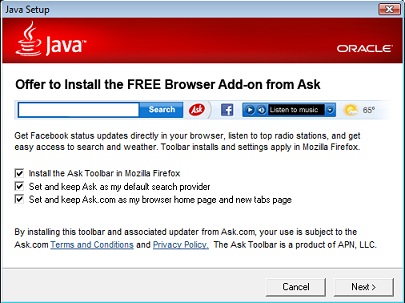
    That being said, I want you to know that even some reliable updates may come with things you might not want. Companies make marketing agreements to offer other companies’ services.  Don’t worry, just read the screens as you go through the update process. Uncheck any boxes or click “no” to anything that is being offered as an “extra benefit.”

    ask_toolbarJava

    A case in point…I updated Java this week and noticed that Java is still trying to install an Ask Toolbar and change my search engine to Ask.  This has happened to my clients in the past and it’s very confusing.  They call me to find out what happened to their Google search box.

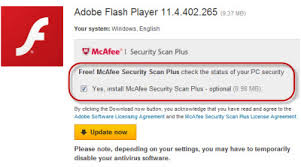
    Even more frustrating is the Adobe Flash update which can install Mcafee antivirus in place of your current antivirus program if you don’t tell it otherwise.adobeflashWithMcAffey

    Please don’t be intimidated and ignore the updates. Just be patient and read the screens before you click “next.”  If you need help, try my new call-in service or make an appointment for a detailed lesson on how to install programs, apps and updates on all your devices.
    Keep Calm and Call Me

    Who do you know that needs to learn how to install programs, apps and updates?  I’m here to help and I promise to take good care of them.  Call me today!   760-348-8867

  • Now Offering – Remote Tutoring!

    Now Offering – Remote Tutoring!

    join.meI’m now offering remote tutoring on your computer or tablet for $50 hr.  

    I had hoped to do smart phones and iPods too, but there isn’t an app for that yet.  For now, we can do your computers and tablets and there’s lots of fun things to learn on those.

    It’s really easy!  You go to join.me, enter my code and join me for our meeting on your device.  I will be able to use your curser and show you how to do things. Then you can take “the Presenter role” and show me.  I will watch and coach as needed.  I think you will really enjoy it.  Call for an appointment today and try it.

  • Protect Your Printer Ink From Drying Up

    Have you had issues with your printer ink dying up while you were on vacation or just because it’s so hot?

    Recently, several of my clients have had issues with their printers not printing clearly because the ink has dried up so I thought it would be helpful to give you some tips on how to prevent this.

    Storing and Handling Ink Cartridges

    • TrioKeep ink cartridges sealed in the original package until they are installed. Store at temperatures between -15 and 35 degrees Celsius (5 and 95 degrees Fahrenheit).

    If you don’t print very often, run a test page or print a page of coloured print once in a while to keep the print head clear and the ink running.  

    To keep cartridges from drying out while you are on vacation, always turn the printer off using the power button, and wait until the power light goes out before you pull the plug or turn off a power strip. This allows the printer to move the cartridges to a capped position.

    If you remove a cartridge from the printer for any reason, try to replace it again as soon as possible. Outside of the printer, if unprotected, cartridges begin to dry out. If the printer uses separate ink cartridges and printhead, the printhead can be damaged if cartridges are not installed.

    If you must store opened cartridges for any reason:

    • place them (nozzles up) in a plastic tub with an airtight lid.

      Image: Plastic tub with an airtight lid
    • Some cartridges have an orange cap that is twisted off to open. If these supplies have been opened, replace the orange cap before it is stored.

    • Place a damp cloth or paper in the tub.  Do not use plastic bags. Do not allow anything to touch the cartridge nozzles.

  • Can’t Type? Try Dragon Naturally Speaking

    Can’t Type?   There is a great solution.

     Dragon Naturally Speaking

    Dragon

    Dragon is similar to the speech recognition apps on smart phones like Siri and Google Voice, but you can train Dragon to recognize your voice and your speech patterns so it gets more and more accurate.  It will even scan the emails in your “Sent” folder to learn your speech patterns. You have to be a little patient in the beginning to correct its mistakes, because that’s how it learns to become more accurate but it’s easy to do.

    I have helped several clients with Dragon and I’m currently working with a man who had a stroke several years ago and is using Dragon to write his emails.  I also connected his computer to his big screen TV so he can see the typing better.  He’s really enjoying it and that has inspired me to consider using myself.  I often feel like my hands can’t keep up with my brain.  My typing is fast but makes so many mistakes, especially when I’m journaling or writing Techie Tips.

    I used it years ago when I was in Real Estate and it worked in all my apps:  email correspondence in Outlook, web searches, composing documents in Word, and making notes in my contact manager.  The newer version of Dragon is even more accurate and easier to train than before and it’s not very expensive.

    Dragon Dictate
    You can get the app for your tablet or smartphone too.
    iTunes                     Google Play Store

    And you can use your smart phone as the microphone for your computer.

     iTunes                      Google Pla

    If you, or someone you know, would like to learn how to use Dragon Naturally Speaking, please let me know. 

    This is a great way to “make peace with the ups and downs of computer technology.”

  • FYI for Current Users of Apple iPhone, iPad and iPod

    FYI:  For Current Owners of Apple Gadgets:

    Ipad And Iphone

    The iOS 8 update is available now for users of iPhone 4 and later, iPad 2 and later, iPad mini and later, and iPod touch (fifth generation).

    You may have to delete some things in order to have enough memory to install the update.  It can take quite a bit of time to look at your apps’ usage and decide what to delete.  (Go to Settings > General > Usage)

    I had to dump 2 GB on my iPhone 4s.  I chose to keep my music for my workouts and dump a lot of photos. I also dumped a bunch of apps I wasn’t using very often.  I didn’t care about them anyway so it was a good incentive for me to do some clean up. I will run the update and report back in next week’s Techie Tip.